


Child Of Shadows
Shadow Slave, Sunless
- Joined
- Feb 18, 2026
- Posts
- 139
- Reputation
- 288
SURVIVAL PROTOCOL: CYBERSECURITY A Practical Guide to Protecting Your Digital Existence
 DISCLAIMER: DEFENSIVE USE ONLY This guide is for educational purposes. Protecting your systems is your right. Attacking others is a crime. Do not cross the line.
I. THE FIRST LINE OF DEFENSE: IDENTITY Your accounts are your digital life. If they fall, you fall. Secure them now.
- Password Hygiene: Never reuse passwords. If one site leaks, all your accounts are at risk. Action: Use a Password Manager (Bitwarden, 1Password, KeePass). Generate 16+ character random strings.
- Multi-Factor Authentication (MFA): This is non-negotiable. SMS is okay, but an Authenticator App (Authy, Google Authenticator) or Hardware Key (YubiKey) is better. Action: Enable MFA on Email, Banking, and Social Media immediately.
- Recovery Options: Ensure your recovery email and phone number are secure. If an attacker changes these, they own you.
- Make sure your recovery email is a fake email address
II. HARDENING THE DEVICE Your computer and phone are your gates. Keep them locked.
Code:
// SECURITY CHECKLIST [ ] OS Updated? [ ] Antivirus Active? [ ] Firewall On? [ ] Unknown Apps Removed?- Updates: When an update comes, install it. It patches holes attackers use. Action: Enable Automatic Updates for OS and Browser. (you can also use Tails or a Linus OS if ur really keen on this, windows updates are more known for adding more backdoors)
- Antivirus/Anti-malware: You need a sentinel. Windows Defender is sufficient for most, but third-party tools exist. Action: Run a full scan weekly. Do not download "cracked" software.
- Permissions: Apps don't need access to everything. Action: Revoke camera, mic, and location access for apps that don't need it.
III. NAVIGATING THE WEB SAFELY The internet is a minefield. Walk carefully.
- Phishing Awareness: Emails asking for urgency are lies. Action: Hover over links to see the real URL. Check the sender address carefully.
- Downloads: Only get software from official stores or vendor sites. Action: Avoid torrent sites and "free" premium software.
- Public Wi-Fi: Coffee shops and airports are dangerous. Action: Use a VPN or Mobile Hotspot for sensitive tasks. Never log into banking on public Wi-Fi.
- Browser Hygiene: Clear cookies. Use privacy-focused extensions (uBlock Origin, Privacy Badger).
IV. DATA BACKUP & RECOVERY If the worst happens, you need a way back. Ransomware doesn't care about your feelings.
- The 3-2-1 Rule: 3 copies of data, 2 different media types, 1 offsite. Action: External Hard Drive + Cloud Storage (Backblaze, Google Drive, OneDrive).
- Offline Backups: Keep one backup disconnected from the network. Action: Unplug your backup drive after syncing. Ransomware can't reach it if it's offline.
- Test Your Backups: A backup you can't restore is useless. Action: Try restoring a file once a month to ensure it works.
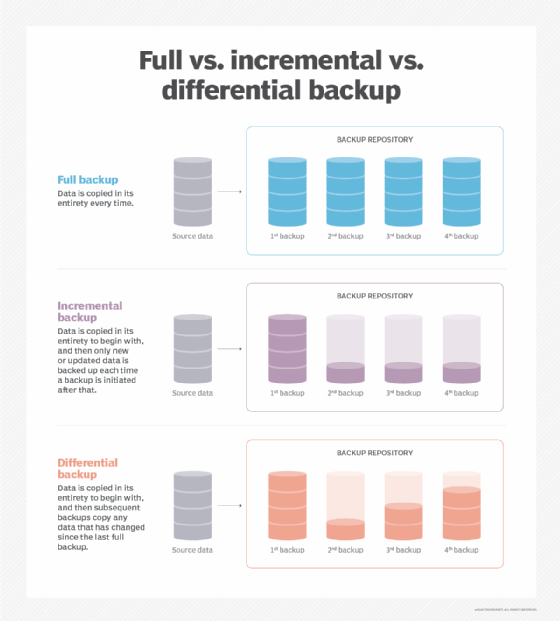
- There are 3 types of backups, full, incremental and differential. Here's a graph on the three over a week.
-
- I suggest looking up a youtube video about this to understand it better
V. PRIVACY & DIGITAL FOOTPRINT The more you reveal, the more you can be targeted. Minimize your exposure.
- Social Media: Don't post your location in real-time. Don't post photos of your ID or mail. Action: Lock down profiles. Limit who can see your friends list and posts.
- Data Brokers: Companies sell your info. You can opt-out. Action: Use services like DeleteMe or manually request removal from data broker sites.
- Email Security: Use aliases for sign-ups. Action: Use services like SimpleLogin or AnonAddy to hide your real email address.
VI. WHAT TO DO IF COMPROMISED If you suspect a breach, act fast. Time is the enemy.
- Disconnect: Unplug from the internet immediately to stop data exfiltration.
- Change Passwords: Start with email and banking. Use a clean device if possible.
- Scan: Run a full malware scan.
- Monitor: Check bank statements and credit reports for suspicious activity.
- If you were compromised by a virus, then unplugging from the internet is the first thing you should do. Unplug all your external hard drives, passwords should be saved on a different device like a USB stick with Kleopatra/TailsOS encryption. You should monitor everything that may have been compromised, bank statements, credit reports, website activity, etc.
Made by Child Of Shadows
© 2026 Cybersecurity Education Initiative. Stay Vigilant. Stay Safe.
AI was used only to refine this text
AI was used only to refine this text
Last edited:











![[G]](/data/avatars/s/55/55362.jpg?1752636930)


