How do I transfer all my files from my hdd

Deleted member 6403

Deleted member 6403

Made It Out The Hood
Joined
Apr 14, 2020
Posts
56,252
Reputation
96,760
To another hdd or computer

Can't boot into my pc and so I'ma reset everything but I don't wanna lose my files, I got hundreds of useful threads and other irreplaceable shit
 
Piss on it.
 
  • +1
Reactions: Danish_Retard
You can clone your hard drive actually. Im not a computer expert but if you look up "how to clone hard drive to new one" or something alone those lines, a lot of good tutorials come up
 
  • Love it
Reactions: Deleted member 6403
You can clone your hard drive actually. Im not a computer expert but if you look up "how to clone hard drive to new one" or something alone those lines, a lot of good tutorials come up
I think I'ma take it out and connect it to a laptop, which is a better option?
 
why the fuck would you ask here instead of just googling it? Just take it out your pc and plug it into your new pc, I really don't see the problem.
 
  • +1
Reactions: Deleted member 6403
why the fuck would you ask here instead of just googling it? Just take it out your pc and plug it into your new pc, I really don't see the problem.
Not enough space on another pc
 
  • +1
Reactions: WadlowMaxxing
I think I'ma take it out and connect it to a laptop, which is a better option?
I was gonna suggest that next, and honestly, I think that's a better option. You can do that by carefully removing the hdd and hooking it up to a internal hdd adapter which basically turns it into a external drive. Then you can reset your computer or whatnot and then put it back in.
 
  • Love it
Reactions: Deleted member 6403
why the fuck would you ask here instead of just googling it? Just take it out your pc and plug it into your new pc, I really don't see the problem.
So I think I'ma use a laptop and another hdd
 
To another hdd or computer

Can't boot into my pc and so I'ma reset everything but I don't wanna lose my files, I got hundreds of useful threads and other irreplaceable shit
Is your new hdd the same size or bigger?
 
  • +1
Reactions: Deleted member 6403
Is your new hdd the same size or bigger?
Smaller since it's a random laptop, I'ma just download the essentials on it then use another hdd for all my extra shit
 
  • +1
Reactions: Deleted member 756
Smaller since it's a random laptop, I'ma just download the essentials on it then use another hdd for all my extra shit
Use something like Google drive or drop box to transfer
 
  • Love it
Reactions: Deleted member 6403
If you are planning to upgrade a larger drive or replacing hard drive on your computer due to its non-functionality, less storage space, bad sectors in the disk, virus attacks, hardware problems or any other problem, then you are doing a perfect job to prevent yourself. Upgrading to a new hard drive will not only improve the performance and efficacy of your computer but it will also boost productivity. Therefore, you will need to copy all your files from your old drive to the new one, if you do not want to miss data of old hard drive.

Changing hard drive is very easy, all you need to do is taking the old one out and plugging the new one into the same spot. But the daunting challenge is how to transfer all the existing folders and files from the old hard drive to the new one?

Tip: One of the well-known approaches is to take the back up of all your files, folders and programs existing on your old hard drive and then restore them into new hard drive. If you are Windows user, you can use the Windows Backup utility to create back up of data. But this approach is not as simple as it seems.

Methods to Transfer Data from Old Hard Drive to New Hard Drive Manually:

Follow the methods that will help you to transfer or move complete data of old hard drive to new hard drive.

Method 1: Use External Drive + Window’s Built-in Tool

This method is used when you plan to install or start afresh your computer’s Windows OS. For performing the method with the help of Windows Easy Transfer, you require an external hard drive for transferring complete data such as documents, photos, videos, etc. from the current hard drive on your computer.

Now, swap the old drive with a new drive and start copying the files, data, folders that you transferred to external hard drive.

To do so follow the steps mentioned below to copy data from external hard drive to the new one.


Step 1:
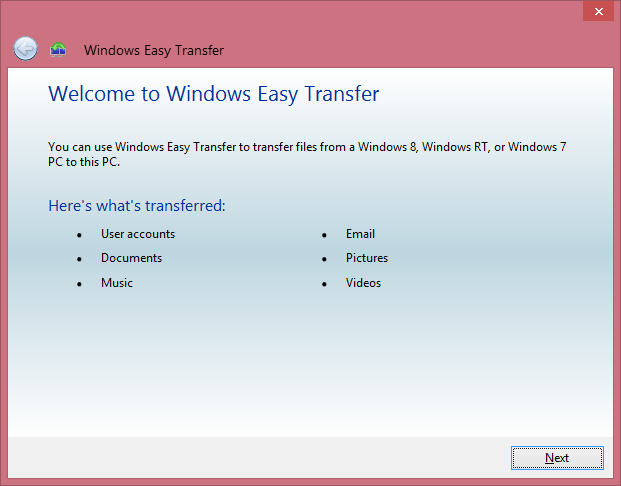
Click Windows button on your keyboard and type Windows Easy Transfer and launch the tool. Click Next to proceed.

Windows Easy Transfer


Step 2: Select the attached external hard drive or USB drive as the target.

Step 3: Select No for This is My New Computer and hit the install to external hard drive. Windows will start copying your data and related settings to the external drive.

Method 2: Copy Directly from Old to New Drive

As you might have noticed that the above method is a bit longer as you have to transfer complete data of old hard drive to an external drive and then copy to new drive. If you want to skip the intermediate drive, simply connect the new and old drives together with the help of a USB-to-SATA-IDE adapter or cable, a computer or laptop hard drive enclosure that allows to hold the old drive and connect the same with the help of a USB cable. If you are using a laptop then you can opt for a hard drive upgrade kit which not only includes the enclosure but also a cloning software from the old drive to the new one.

If you take into account this method then you will have two options: First, cloning the old hard drive and secondly, copying just the data.

Option 1: Cloning the Old Hard Drive:

Step 1: Connect the new hard drive to the laptop with the help of USB cable.

Step 2: Use the cloning software and clone the old hard drive onto the new hard drive.

Step 3: Now, remove the old drive and install the new drive.

Option 2: Copying just the Data:

Step 1: Place the new drive into the laptop or computer.

Step 2: Now, install Windows OS onto the new drive and other applications on the new hard drive.

Step 3: Finally, connect the old drive with the help of USB cable or enclosure and copy the data folders to the new one (for doing this you can consider using the Windows Easy Transfer utility mentioned in Method 1 above).
 
  • +1
Reactions: WadlowMaxxing and Deleted member 6403

Similar threads

S
Replies
6
Views
159
spongebob
spongebob
HowToBasic
Replies
28
Views
407
Just Blast
Just Blast
BigBallsLarry
Replies
120
Views
1K
BigBallsLarry
BigBallsLarry
Greyascension
Replies
0
Views
204
Greyascension
Greyascension
goo25
Replies
2
Views
130
goo25
goo25

Users who are viewing this thread

Back
Top