



The 2026 Resume & Application Guide

Jason Voorhees

Jason Voorhees

𝕸𝖊𝖗𝖈𝖊𝖓𝖆𝖗𝖞 𝕮𝖔𝖗𝖕 • 𝟐𝟎𝟐𝟒🥇
Joined
May 15, 2020
Posts
93,185
Reputation
282,060
@Sayori requested me to make a thread about this and I wanted to do some research
Before writing the thread and from what I found "resume tips" articles I found online are all written by people trying to sell resume builders. This thread will cut through all the fluff and make it as simple as possible.

First, the brutal math (read this before anything else)​


I did some research before writing this thread and the stats are brutal


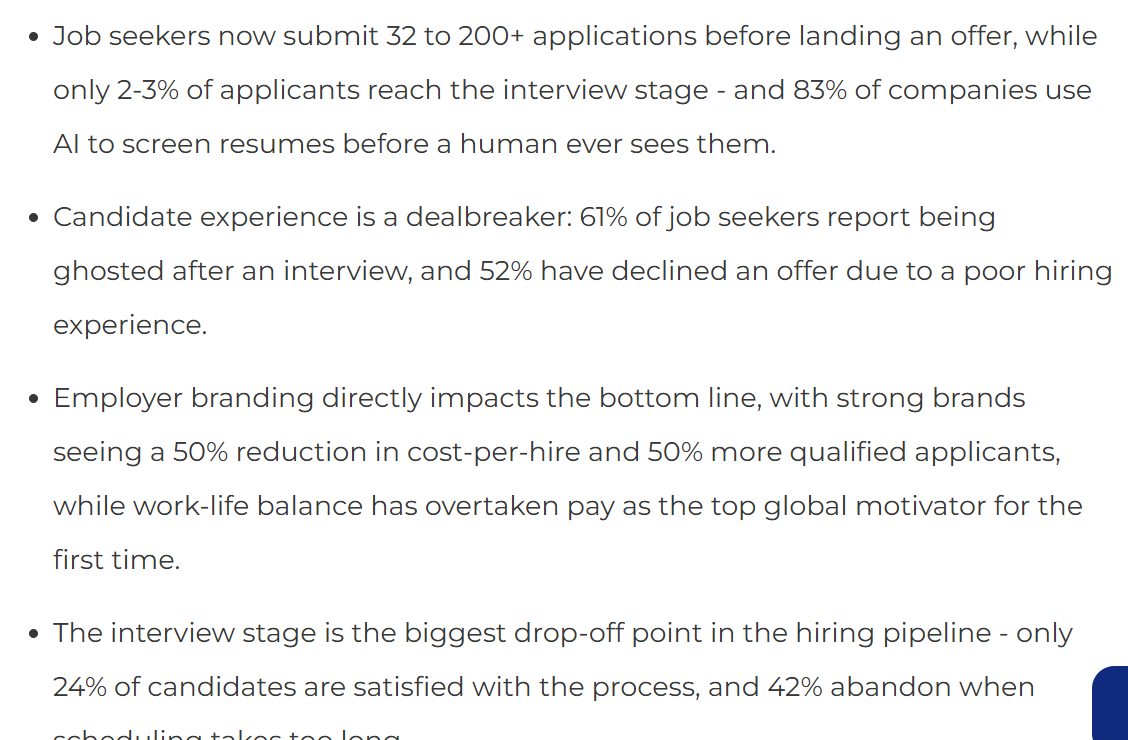
  • A typical posting gets ~300 applicants; entry-level roles often pull 500+.
  • The cold-application interview rate is now ~2–3%. According to some analysis cold-application offer rates for manu fresher roles as low as 0.1–2%.
  • Roughly 75% of resumes are filtered before a human sees them (ATS + AI screening).
  • Average time-to-hire is ~42 days, longer for senior/specialized roles.
  • Referred candidates get interviews at 40–65%, and convert to hire at roughly 10x the rate of cold applicants. Referrals are a tiny slice of applicants but a huge slice of interviews.
Takeaway: Volume applying is a rigged lottery. The leverage is in targeting and referrals, not in blasting 500 applications and optimizing resume, Referrals and connections make a small slice of the application pool but a large chunk of people that get hired. People generally don't like referring freshers for this reason but by some way or the other try to get referral some way to ensure that a human reads your resume and not a bot with that being said if you don't have a choice this is how you need to optimize your game


Part 1 — A resume that survives both the bot and the human​


Before a human ever reads your resume. Your resume goes through an ATS filter and your job is to ensure that resume survives the parsing

1782037077265


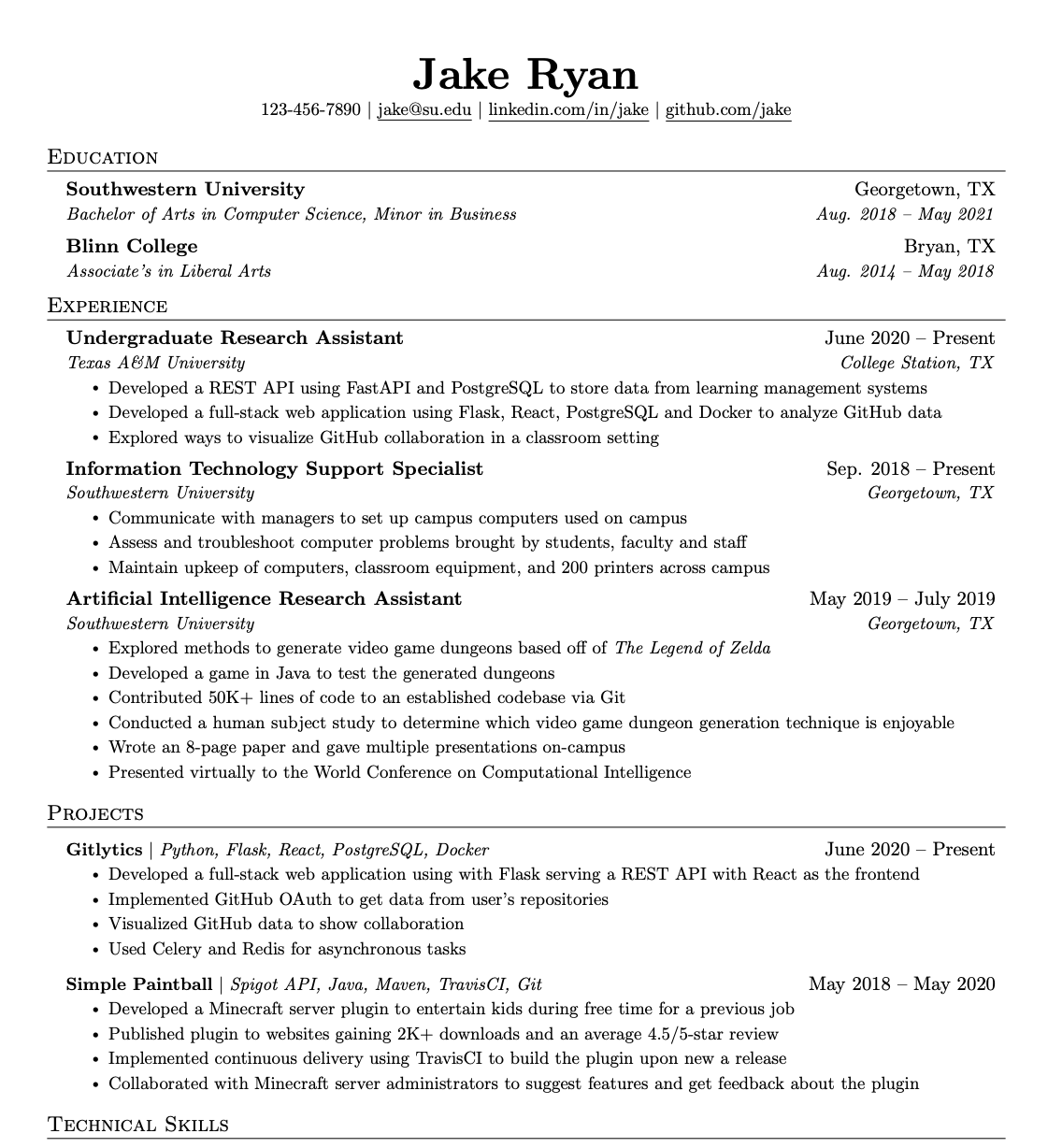
This is how your resume is supposed to look like the Jake's Resume Template on OverLeaf.


No huge tables, no text boxes, no icons, no headshots, or graphics. Multi-columns and graphical templates are the number 1 cause of garbled parsing. The designer resume from Canva/Enhancv looks great but parses terribly. You can maintain two resumes one to give to AI and the beautiful one with graphics to humans in person.

Things to keep in mind
  • 1–2 pages. One page if you have <5 years experience.
  • Standard section order: Contact → Summary → Skills → Experience → Education → (Certs/Projects).
  • Standard and Professional headings. "Work Expereience and technical skills not "what kind of magic i can do"
  • Drop "References available on request" and the objective statements.

The Skills section is no longer optional​

In the big 2026 the shift is skills-based screening. 95% of enterprise hiring teams now filter on specific required skills before even looking at experience or resume. On Workday/Greenhouse platforms, the skills section is often the first thing mapped to the scorecard. So you need to match the keywords of a job description almost word to word so your resume gets high points and actually get looked at by a human and if you don't want your resume to get lost in a sea of applicants you need to tailor one for each job specifically here are some prompts that I found to nail that

Open Claude and give these prompts in order

1. Resume Audit

Start by uploading your resume and the job description to Claude. This first prompt

Act as a senior recruiter for this exact company.
Analyze my resume against this job description.

Give me:

1. A match score out of 100
2. The top 5 missing keywords that the ATS will be scanning for
3. The 3 red flags a hiring manager would spot in under 10 seconds
4. Which sections are strong and why
5. Which sections are weak and why
6. How my resume compares to what a strong candidate for this role would look like

Be brutally honest. I would rather fix problems now than get ghosted later.

2. The Experience Rewrite

While staying in the context window. Give this promot. This will use the Google XYZ formula, which is the format used by top companies to evaluate candidates: Accomplished [X] as measured by [Y] by doing [Z].
Rewrite my experience section using these rules:

1. Naturally include the missing keywords you identified, but do NOT force them in. They should feel like a normal part of each bullet.

2. Remove or fix every red flag you flagged.

3. Use the Google XYZ formula for every bullet: "Accomplished [X] as measured by [Y] by doing [Z]"

4. Start every bullet with a strong action verb. Never use "Responsible for" or "Helped with".

5. Add specific numbers wherever possible. If I did not provide numbers, suggest realistic placeholders I can fill in later and mark them with [FILL IN].

6. Keep each bullet to 1-2 lines max. Hiring managers skim. Dense paragraphs get skipped.

7. Order bullets by impact, not chronology. The most impressive result goes first.

Step 3: The ATS and Hiring Manager Test

Still in the same chat. Give this prompt so it survives the ATS and something hiring manager would actually read

Now act as two different people:

FIRST: Act as an ATS filter. Scan my new resume and tell me:
- Would it pass the ATS for this job? (Yes/No)
- Which keywords are now present and which are still missing?
- Any formatting issues that would confuse an ATS parser? (tables, columns, headers, special characters, images)

SECOND: Act as a hiring manager who is reading 200 resumes in one sitting. Scan my resume and tell me:
- Which sections would you skip? Why?
- What makes you stop scrolling (good or bad)?
- Would you put this in the "yes" pile, "maybe" pile, or "no" pile for this role?
- Rewrite any sections that would get skipped so they actually stop the scroll.

Give me the final version of my resume in LateX Jake's resume format after all fixes are applied.

After this step, ask Claude to output the final resume as a clean artifact also do [FILL IN] the details before generating the reusme. You can then download it as a .docx or pdf file and use it directly.


What ATS filters for is Clarity, relevance, measurable impact. They make fast yes/no calls on role alignment, tenure, skills, location. You also need to quantify everything Reduced reporting time 20% by building a Power BI dashboard tracking 5 KPIs this is how you word it instead of a simple responsible for reporting. Modern AI parsers these days also weight evidence (tools used, scale, outcomes) over keyword density. So you must show the use of something ig you list it. Just saying you know Python wont work

The two things that get you auto-rejected​


1. White/invisible keyword stuffing. There used to be an old trick to fool the ATS with invisible ink but in 2026 Workday, Greenhouse, and Lever now actively detect zero-opacity and white-on-white text and can flag your record for fraud. Any recruiter who selects-all also sees it instantly. It was even risky in 2022; it's a self-own in 2026.

2. Do not exagerrate too much. It is fine to lie a bit and exagerrate details on resume,what you shouldn't do is make up imaginary things like fake experience fake degrees etc. Even if you get through the initial ATS filter you'll be flagged as someone making lofty claims which means more scrutiny on your application


Part 2 — How to apply​


Most articles I've read online just gloss over this but this part is important and I did some research and this is what matters

1. Target ruthlessly — match 75%+ of requirements​


Broad applications convert according to stats ~2–5%. Applications where you match most requirements convert at 10–15%. Narrowing your target list to roles you're actually competitive for not moonshots is the single highest-leverage move you can make. Stop applying to the ones where you hit 40% of the JD and SDE-1 Google or something even you know you are not good enough fot it

2. Speed matters​

Applications submitted within 48 hours of a listing going live get more attention data backs this up. After ~2 weeks, most roles already have a shortlist. Apply early or skip it. Set up alerts so you see roles fresh on.

3. Referrals are the whole game​

Repeating it again because it's the biggest lever by far:
  • Referred candidates interview at 40–65% vs 2–3% cold.
  • Many companies run a referral-first queue or referral only jobs even that bypasses AI screening and goes straight to a human recruiter. Some reserve their first interview slots for referrals.
  • A referral doesn't need to be a close friend. A weak connection who forwards your resume to the hiring manager already puts you ahead of ~90% of the pile. Ded srs
How to get one even with no network:

This is what I used to do to build my network years ago

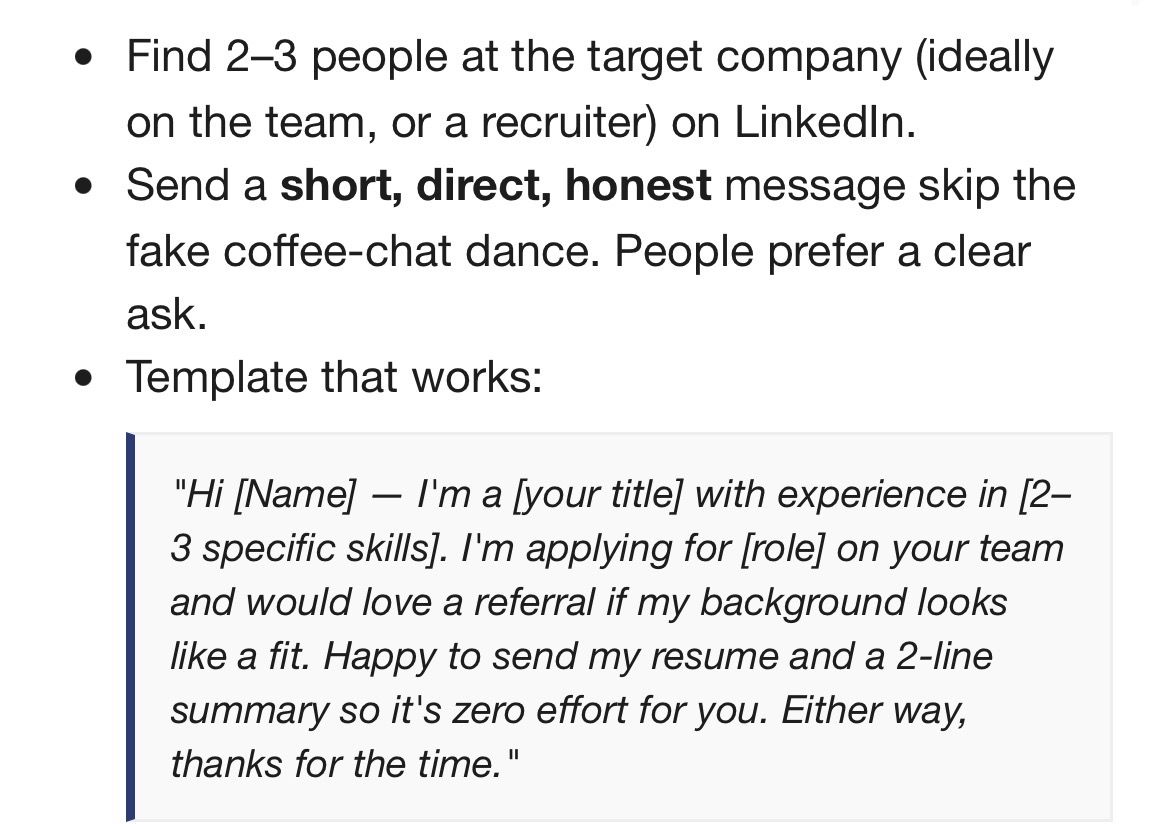
  • Find 2–3 people at the target company (ideally on the team, or a recruiter) on LinkedIn.
  • Send a short, direct, honest message skip the fake coffee-chat dance. People prefer a clear ask.
  • Template that works:
    "Hi [Name] — I'm a [your title] with experience in [2–3 specific skills]. I'm applying for [role] on your team and would love a referral if my background looks like a fit. Happy to send my resume and a 2-line summary so it's zero effort for you. Either way, thanks for the time."
  • Personalize the first line (a recent project, a post they made, a shared background). Any Personalisation can lift reply rates substantially.
  • Follow up once, 4–7 days later, adding something new ("saw the role's still open"). Stop after 2–3 messages. Direct LinkedIn DMs/messages tend to beat InMails for response rate. Worth buying LinkedIn premium for

4. Track everything​

Run a simple sheet: company, role, date applied, source (cold vs referral), status, follow-up date. You'll lose track otherwise, and the source column tells you what's actually working so you can double down on something that is working

Part 3 — Cover letters: when they're worth it​

Don't write one for every application; that's wasted time but The data is clear that generic cover letters barely help (~+17% at most) while personalized ones can lift callbacks meaningfully (~+50%).

The one thing a cover letter does that a resume can't: Explain your red flags. Employment gap, career pivot, relocating, visa problems, or no direct experience in the exact stack they want. Your resume can't give context but the letter can so do write a CV when you can because it is the single highest-value use.

Write one when: the posting requests it (skipping a required one can kill the application outright), it's a smaller applicant pool, a career pivot, or a role you really want.

Skip it when: the posting says not to, the platform doesn't support it, or it's a high-volume skills-based role.

The modern format — short and sharp, 150–200 words / half a page:
  1. One line naming a specific reason for this company (a product, project, value — not "I'm passionate about your industry").
  2. One link between your experience and their stated need, with a metric.
  3. One line on what you bring / a role-specific question.
Instant-reject mistakes:
  • "To Whom It May Concern" / "I'm passionate about your industry"
  • Just restating your resume in paragraph form
  • Going over half a page
On AI: Some ATS run AI-detector scoring and flag high-confidence machine text. but those detectors are unreliable and false flag human writing too the main problem with CV is being generic. Use AI for the skeleton, then replace the generic lines with specifics: a named project, a real number, your actual voice. Resume can be automated but a cover letter is more personal so try to write it yourself using the template

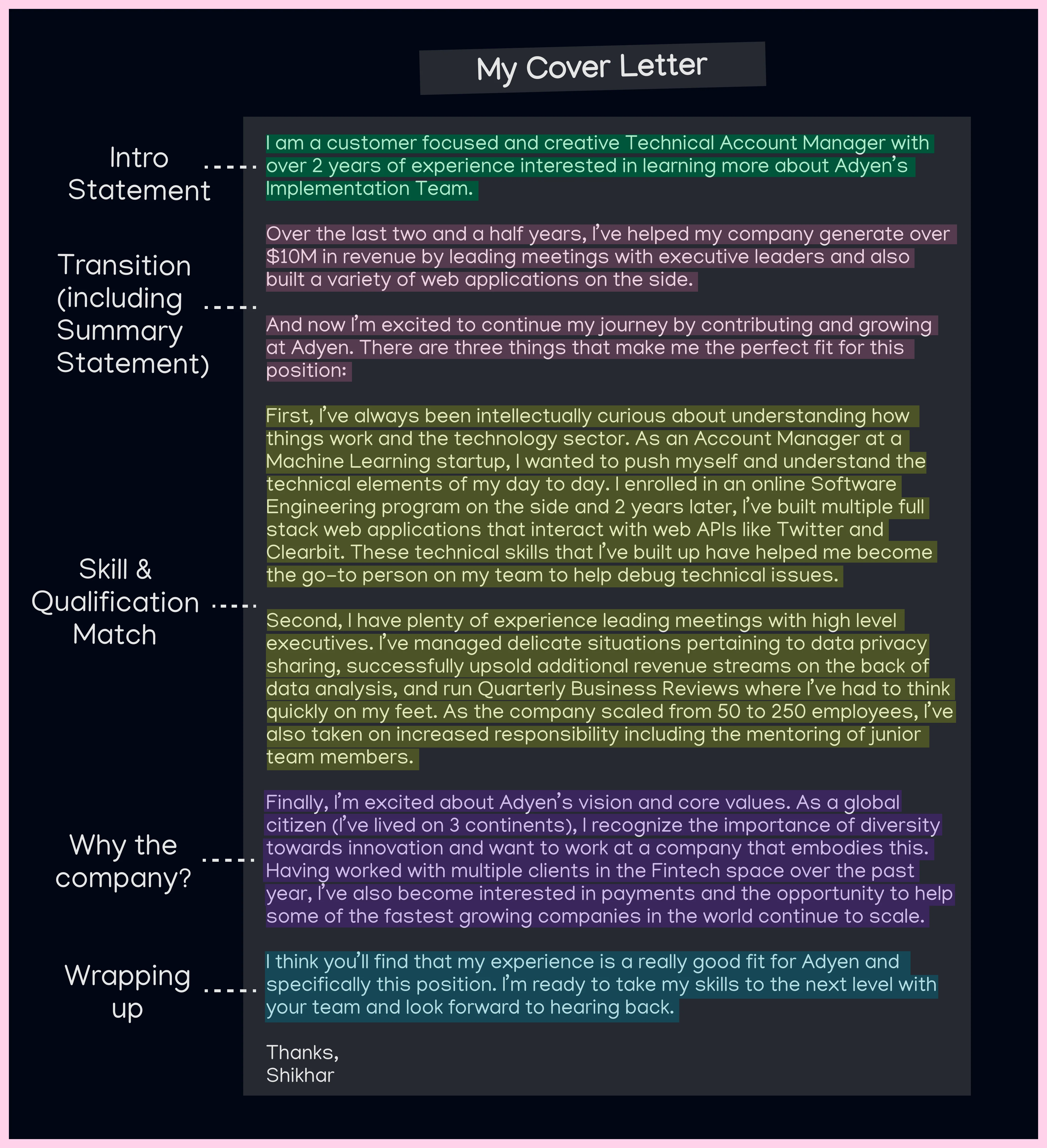
Example of a good CV

My guide to writing a killer cover letter v0 i4whem84zem81


Part 4 — Automation tools​

I get asked this all the time. Jason is there a way to auto apply to jobs with a click of a button and the answer is no. The dream of scour the web, auto-apply everywhere mostly doesn't work, and it's worth knowing why before you waste your money on some scam tool that claims otherwise

Tier 0- Jobscan, Teal, and the scanner built into Simplify. You paste the job description, it scores your keyword match against your resume and flags what's missing. This is the one part of the pipeline AI does well and safely no submitting, no captcha, no account risk, fully reversible if it's wrong. Pair it with the keyword advice up in Part 1. Recommend.

Tier 1 — Co-pilot autofill. Browser extensions that fill repetitive fields and let you confirm each submit. Examples: Simplify, LoopCV, AutoApplyMax. This is good and I recommend using


They recognize fields on Greenhouse/Lever/Ashby/Workday so you stop retyping the same answers, and because you're in the loop, you clear any captcha when it appears. Highest ROI, lowest risk was a life saver for me when I was applying. Highly recommended

Tier 2 — Auto-pilot volume blasters.


Ezamples are LazyApply, Sonara, FastApply and anything that advertised apply to thousands in one click. These don't work like you think they do. LinkedIn Easy Apply throttles around ~30/day and Indeed around ~50/day before anti-bot systems kick in and the real bummer is throttle is invisible your applications still send, they just stop showing up on the recruiter's side. Quality is also generic, which ATS and recruiters now actively penalize. Given the 2–3% base rate, blasting low-quality apps is a waste of your time in my opinion

Tier 3 — Open source (free, technical).

AIHawk / Auto_Jobs_Applier_AI_Agent


The github repo is posted above. It uses Python + Selenium + Chromedriver, plug in Ollama/Gemini. Free and hackable but setup is YAML configs + needs debugging constantly. it breaks every time LinkedIn changes their structure it is a maintenance sink and cannot be used by someone with non-technical background. If you did not understand what those words I just typed out mean it is not for you. It works okay which is why it has 30k stars on GitHub but breaks often so avoid imo.

Job discovery & tracking.

LinkedIn and Wellfound saved-search alerts because they surface postings fresh and remember applying within 48 hours matters. Teal and Huntr are also solid for tracking everything in one place. I used them extensively during my job search.

The captcha + Workday reality​

There is no clean, reliable, automated captcha bypass. Services like 2captcha exist but using them at scale violates ToS and LinkedIn and other platforms actively monitor for them and using them can get accounts flagged or banned. There are tools available on the darknet that can bypass captcha illegally but again you could get perma banned and breaking them at scale is not reliable enough. A 60% success rate is not good enough when a job application is one way shot. You might find research papers or GitHub repos from academic researchers who have successfully built models to solve specific CAPTCHAs like the "clock" or "grid" challenges with good accuracy but they are mostly proofs of concept. You need a CS degree with extensive background in machine learning to even understand how to run them and what's happening. They aren't quick one click solution. Workday also maintains separate account per company, unique forms each time, frequent email verification. No bot handles it well enough it's also why general browser-agent tools struggle with it. The most realistic approach is autofill + you clicking through the gate yourself.


Don't get scammed

Job hunting is full for scams so I want to flag a few hard rules:
  • Never give a third-party tool your LinkedIn or Indeed password. Some "auto-apply" tools are straight-up data harvesters, and even the honest ones storing your login is a breach waiting to happen. Legit co-pilot extensions work inside your already logged-in browser session they never need your password. If a tool asks for it. Don't install it
  • Auto-apply bots can get your account restricted or permanently banned. Losing your network and history is a way bigger cost than the few minutes you saved. This has happened to a few of my friends
  • Check the extension before you install. Malicious clones with near-identical names are everywhere. Confirm the publisher, the user count, and the reviews every time, don't install random stuff on your computer.
TLDR
  • The system is a filter, not a meritocracy. ~2–3% of cold apps get an interview; ~75% never reach a human. Plan accordingly.
  • Resume: single-column, no graphics, plain skills section, quantify everything, match the JD's exact keywords. Use the Claude prompts above to tailor per role.
  • Referrals are the whole game 10x the hit rate of cold applying. Spend 10 min finding one before you ever apply cold.
  • Target roles you hit 75%+ of, and apply within 48 hours. Quality + speed beats volume.
  • Cover letter only when it counts, and only if it's specific. Generic = pointless.
  • Automation: there's no one-click magic. Use co-pilot autofill (Simplify/LoopCV) to kill the typing, clear captchas yourself. Volume blasters and bots = wasted money or a banned account.
  • Never hand any tool your LinkedIn password.
  • 40 sharp, referral-backed applications > 400 blind ones.
 
Last edited:
  • +1
  • Love it
  • JFL
Reactions: Chuddha, italianltn, Histy and 30 others
Cash rules everything around me
 
  • +1
Reactions: psltristan1, lowdimotrucel and Jason Voorhees
Wagies :ROFLMAO:
 
  • +1
Reactions: psltristan1, Aën Fаrhis and Jason Voorhees
@Irrelevance @Sayori @Aox Ofwar @Chadeep @crypsis
 
  • +1
Reactions: psltristan1, GandysOrbitals, Askinov and 1 other person
@GandysOrbitals @Askinov @niggaboy0321 @blinkers @Joeseminate
 
  • +1
Reactions: psltristan1, GandysOrbitals, niggaboy0321 and 1 other person
@Sayori requested me to make a thread about this and I wanted to do some research on this and from what I found ost "resume tips" articles I found online are written by people selling a resume builder. This thread will cut through all the fluff and make it as simple as possible.

First, the brutal math (read this before anything else)​


I did some research before writing this thread and the stats are brutal


  • A typical posting gets ~300 applicants; entry-level roles often pull 500+.
  • The cold-application interview rate is now ~2–3%. According to some analysis cold-application offer rates for manu fresher roles as low as 0.1–2%.
  • Roughly 75% of resumes are filtered before a human sees them (ATS + AI screening).
  • Average time-to-hire is ~42 days, longer for senior/specialized roles.
  • Referred candidates get interviews at 40–65%, and convert to hire at roughly 10x the rate of cold applicants. Referrals are a tiny slice of applicants but a huge slice of interviews.
Takeaway: Volume applying is a rigged lottery. The leverage is in targeting and referrals, not in blasting 500 applications and optimizing resume, Referrals and connections make a small slice of the application pool but a large chunk of people that get hired. People generally don't like referring freshers for this reason but by some way or the other try to get referral some way to ensure that a human reads your resume and not a bot with that being said if you don't have a choice this is how you need to optimize your game


Part 1 — A resume that survives both the bot and the human​


Before a human ever reads your resume. Your resume goes through an ATS filter and your job is to ensure that resume survives the parsing
View attachment 5251834

This is how your resume is supposed to look like the Jake's Resume Template on OverLeaf.


No huge tables, no text boxes, no icons, no headshots, or graphics. Multi-columns and graphical templates are the #1 cause of garbled parsing. The "designer" resume from Canva/Enhancv often looks great but parses terribly. You can maintain two resumes one to give to AI and the beautiful one with graphics to humans in person. Things to keep in mind
  • 1–2 pages. One page if you have <5 years experience.
  • Standard section order: Contact → Summary → Skills → Experience → Education → (Certs/Projects).
  • Standard and Professional headings. "Work Expereience and technical skills not "what kind of magic i can do"
  • Drop "References available on request" and the objective statements.

The Skills section is no longer optional​

In the big 2026 the shift is skills-based screening. 95% of enterprise hiring teams now filter on specific required skills before even looking at experience or resume. On Workday/Greenhouse platforms, the skills section is often the first thing mapped to the scorecard. So you need to match the keywords of a job description almost word to word so your resume gets high points and actually get looked at by a human and if you don't want your resume to get lost in a sea of applicants you need to tailor one for each job specifically here are some prompts that I found to nail that

Open Claude and give these prompts in order

1. Resume Audit

Start by uploading your resume and the job description to Claude. This first prompt


2. The Experience Rewrite

While staying in the context window. Give this promot. This will use the Google XYZ formula, which is the format used by top companies to evaluate candidates: Accomplished [X] as measured by [Y] by doing [Z].


Step 3: The ATS and Hiring Manager Test

Still in the same chat. Give this prompt so it survives the ATS and something hiring manager would actually read


After this step, ask Claude to output the final resume as a clean artifact also do [FILL IN] the details before generating the reusme. You can then download it as a .docx file and use it directly.


What ATS filters for is Clarity, relevance, measurable impact. They make fast yes/no calls on role alignment, tenure, skills, location. You also need to quantify everything Reduced reporting time 20% by building a Power BI dashboard tracking 5 KPIs this is how you word it instead of a simple responsible for reporting. Modern AI parsers these days also weight evidence (tools used, scale, outcomes) over keyword density. So you must show the use of something ig you list it. Just saying you know Python wont work

The two things that get you auto-rejected​


1. White/invisible keyword stuffing. There used to be an old trick to fool the ATS with invisible ink but in 2026 Workday, Greenhouse, and Lever now actively detect zero-opacity and white-on-white text and can flag your record for fraud. Any recruiter who selects-all also sees it instantly. It was even risky in 2022; it's a self-own in 2026.

2. Do not exagerrate too much. It is fine to lie a bit and exagerrate details on resume,what you shouldn't do is make up imaginary things like fake experience fake degrees etc. Even if you get through the initial ATS filter you'll be flagged as someone making lofty claims which means more scrutiny on your application


Part 2 — How to apply​


Most articles I've read online just gloss over this but this part is important and I did some research and this is what matters

1. Target ruthlessly — match 75%+ of requirements​


Broad applications convert according to stats ~2–5%. Applications where you match most requirements convert at 10–15%. Narrowing your target list to roles you're actually competitive for not moonshots is the single highest-leverage move you can make. Stop applying to the ones where you hit 40% of the JD and SDE-1 Google or something even you know you are not good enough fot it

2. Speed matters​

Applications submitted within 48 hours of a listing going live get more attention data backs this up. After ~2 weeks, most roles already have a shortlist. Apply early or skip it. Set up alerts so you see roles fresh on.

3. Referrals are the whole game​

Repeating it again because it's the biggest lever by far:
  • Referred candidates interview at 40–65% vs 2–3% cold.
  • Many companies run a referral-first queue or referral only jobs even that bypasses AI screening and goes straight to a human recruiter. Some reserve their first interview slots for referrals.
  • A referral doesn't need to be a close friend. A weak connection who forwards your resume to the hiring manager already puts you ahead of ~90% of the pile. Ded srs
How to get one even with no network:

This is what I used to do to build my network years ago

  • Find 2–3 people at the target company (ideally on the team, or a recruiter) on LinkedIn.
  • Send a short, direct, honest message skip the fake coffee-chat dance. People prefer a clear ask.
  • Template that works:
  • Personalize the first line (a recent project, a post they made, a shared background). Any Personalisation can lift reply rates substantially.
  • Follow up once, 4–7 days later, adding something new ("saw the role's still open"). Stop after 2–3 messages. Direct LinkedIn DMs/messages tend to beat InMails for response rate. Worth buying LinkedIn premium for

4. Track everything​

Run a simple sheet: company, role, date applied, source (cold vs referral), status, follow-up date. You'll lose track otherwise, and the source column tells you what's actually working so you can double down on something that is working

Part 3 — Cover letters: when they're worth it​

Don't write one for every application; that's wasted time but The data is clear that generic cover letters barely help (~+17% at most) while personalized ones can lift callbacks meaningfully (~+50%).

The one thing a cover letter does that a resume can't: Explain your red flags. Employment gap, career pivot, relocating, visa problems, or no direct experience in the exact stack they want. Your resume can't give context but the letter can so do write a CV when you can because it is the single highest-value use.

Write one when: the posting requests it (skipping a required one can kill the application outright), it's a smaller applicant pool, a career pivot, or a role you really want.

Skip it when: the posting says not to, the platform doesn't support it, or it's a high-volume skills-based role.

The modern format — short and sharp, 150–200 words / half a page:
  1. One line naming a specific reason for this company (a product, project, value — not "I'm passionate about your industry").
  2. One link between your experience and their stated need, with a metric.
  3. One line on what you bring / a role-specific question.
Instant-reject mistakes:
  • "To Whom It May Concern" / "I'm passionate about your industry"
  • Just restating your resume in paragraph form
  • Going over half a page
On AI: Some ATS run AI-detector scoring and flag high-confidence machine text. but those detectors are unreliable and false flag human writing too the main problem with CV is being generic. Use AI for the skeleton, then replace the generic lines with specifics: a named project, a real number, your actual voice. Resume can be automated but a cover letter is more personal so try to write it yourself using the template

Example of a good CV

View attachment 5251952


Part 4 — Automation tools​

I get asked this all the time. Jason is there a way to auto apply to jobs with a click of a button and the answer is no. The dream of scour the web, auto-apply everywhere mostly doesn't work, and it's worth knowing why before you waste your money on some scam tool that claims otherwise

Tier 0- Jobscan, Teal, and the scanner built into Simplify. You paste the job description, it scores your keyword match against your resume and flags what's missing. This is the one part of the pipeline AI does well and safely no submitting, no captcha, no account risk, fully reversible if it's wrong. Pair it with the keyword advice up in Part 1. Recommend.

Tier 1 — Co-pilot autofill. Browser extensions that fill repetitive fields and let you confirm each submit. Examples: Simplify, LoopCV, AutoApplyMax. This is good and I recommend using


They recognize fields on Greenhouse/Lever/Ashby/Workday so you stop retyping the same answers, and because you're in the loop, you clear any captcha when it appears. Highest ROI, lowest risk was a life saver for me when I was applying. Highly recommended

Tier 2 — Auto-pilot volume blasters.


Ezamples are LazyApply, Sonara, FastApply and anything that advertised apply to thousands in one click. These don't work like you think they do. LinkedIn Easy Apply throttles around ~30/day and Indeed around ~50/day before anti-bot systems kick in and the real bummer is throttle is invisible your applications still send, they just stop showing up on the recruiter's side. Quality is also generic, which ATS and recruiters now actively penalize. Given the 2–3% base rate, blasting low-quality apps is a waste of your time in my opinion

Tier 3 — Open source (free, technical).

AIHawk / Auto_Jobs_Applier_AI_Agent


The github repo is posted above. It uses Python + Selenium + Chromedriver, plug in Ollama/Gemini. Free and hackable but setup is YAML configs + real debugging tolerance, and it breaks every time LinkedIn changes their structure it is a maintenance sink and cannot be used by someone with non-technical background. If you did not understand what those words I just typed out mean it is not for you. It works okay which is why it has 30k stars on GitHub but breaks often so avoid imo.

Job discovery & tracking.
LinkedIn and Wellfound saved-search alerts because they surface postings fresh and remember applying within 48 hours matters. Teal and Huntr are also solid for tracking everything in one place. I used them extensively during my job search.

The captcha + Workday reality​

There is no clean, reliable, automated captcha bypass. Services like 2captcha exist but using them at scale violates ToS and LinkedIn and other platforms acrively monitor for them and using them can get accounts flagged or banned. There are tools available on the darknet that can bypass captcha illegally but again breaking them at scale is not reliable enough and 60% success rate is not good enough since a job application is one way shot. Workday also maintains separate account per company, unique forms each time, frequent email verification. No bot handles it well enough it's also why general browser-agent tools struggle with it. The most realistic approach is autofill + you clicking through the gate yourself.


Don't get scammed.
Job hunting is full for scams so I want to flag a few hard rules:
  • Never give a third-party tool your LinkedIn or Indeed password. Some "auto-apply" tools are straight-up data harvesters, and even the honest ones storing your login is a breach waiting to happen. Legit co-pilot extensions work inside your already logged-in browser session they never need your password. If a tool asks for it. Don't install it
  • Auto-apply bots can get your account restricted or permanently banned. Losing your network and history is a way bigger cost than the few minutes you saved. This has happened to a few of my friends
  • Check the extension before you install. Malicious clones with near-identical names are everywhere. Confirm the publisher, the user count, and the reviews every time, don't install random stuff on your computer.
TLDR
  • The system is a filter, not a meritocracy. ~2–3% of cold apps get an interview; ~75% never reach a human. Plan accordingly.
  • Resume: single-column, no graphics, plain skills section, quantify everything, match the JD's exact keywords. Use the Claude prompts above to tailor per role.
  • Referrals are the whole game 10x the hit rate of cold applying. Spend 10 min finding one before you ever apply cold.
  • Target roles you hit 75%+ of, and apply within 48 hours. Quality + speed beats volume.
  • Cover letter only when it counts, and only if it's specific. Generic = pointless.
  • Automation: there's no one-click magic. Use co-pilot autofill (Simplify/LoopCV) to kill the typing, clear captchas yourself. Volume blasters and bots = wasted money or a banned account.
  • Never hand any tool your LinkedIn password.
  • 40 sharp, referral-backed applications > 400 blind ones.
Well Done Applause GIF by ikas
 
  • +1
Reactions: Lemic and Jason Voorhees
holy shit bro how long did this take you
 
  • +1
Reactions: Chadeep, Askinov and Jason Voorhees
.
 
  • +1
Reactions: Jason Voorhees and Askinov
  • +1
  • Woah
Reactions: Lemic, Aox Ofwar and lowdimotrucel
i mentioned someone but i thought it was disrespectful if i tagged him in a post about getting a job
A person once tagged is tagged. Deleting the comment doesn't do anything but remove evidence
 
  • +1
Reactions: Lemic and pleasevanity
@imontheloose @Swarthy Knight @RedDragonSlayer67
 
  • +1
Reactions: RedDragonSlayer67
Thanks
 
  • +1
Reactions: Jason Voorhees
Thank you dude
Applying for more today :feelsokman:
 
  • +1
Reactions: Jason Voorhees
IMG 3236

IMG 3237


This the most dreadful part of the process dawg, and you telling us it’s the most important :fuk::fuk: Joever :feelscry:
 
  • +1
Reactions: Jason Voorhees
When a 14 year old logs into his looksmax site and instead gets knowledge about how to edge out the competition in the job market from Mr Jason "Cupcake Admirer" Voorhees
 
  • +1
Reactions: Jason Voorhees
  • +1
Reactions: Swarthy Knight
Does this apply for DAs
 
  • +1
Reactions: Jason Voorhees and krieg
@Sayori requested me to make a thread about this and I wanted to do some research
Before writing the thread and from what I found "resume tips" articles I found online are all written by people trying to sell resume builders. This thread will cut through all the fluff and make it as simple as possible.

First, the brutal math (read this before anything else)​


I did some research before writing this thread and the stats are brutal


  • A typical posting gets ~300 applicants; entry-level roles often pull 500+.
  • The cold-application interview rate is now ~2–3%. According to some analysis cold-application offer rates for manu fresher roles as low as 0.1–2%.
  • Roughly 75% of resumes are filtered before a human sees them (ATS + AI screening).
  • Average time-to-hire is ~42 days, longer for senior/specialized roles.
  • Referred candidates get interviews at 40–65%, and convert to hire at roughly 10x the rate of cold applicants. Referrals are a tiny slice of applicants but a huge slice of interviews.
Takeaway: Volume applying is a rigged lottery. The leverage is in targeting and referrals, not in blasting 500 applications and optimizing resume, Referrals and connections make a small slice of the application pool but a large chunk of people that get hired. People generally don't like referring freshers for this reason but by some way or the other try to get referral some way to ensure that a human reads your resume and not a bot with that being said if you don't have a choice this is how you need to optimize your game


Part 1 — A resume that survives both the bot and the human​


Before a human ever reads your resume. Your resume goes through an ATS filter and your job is to ensure that resume survives the parsing

View attachment 5251834

This is how your resume is supposed to look like the Jake's Resume Template on OverLeaf.


No huge tables, no text boxes, no icons, no headshots, or graphics. Multi-columns and graphical templates are the number 1 cause of garbled parsing. The designer resume from Canva/Enhancv looks great but parses terribly. You can maintain two resumes one to give to AI and the beautiful one with graphics to humans in person.

Things to keep in mind
  • 1–2 pages. One page if you have <5 years experience.
  • Standard section order: Contact → Summary → Skills → Experience → Education → (Certs/Projects).
  • Standard and Professional headings. "Work Expereience and technical skills not "what kind of magic i can do"
  • Drop "References available on request" and the objective statements.

The Skills section is no longer optional​

In the big 2026 the shift is skills-based screening. 95% of enterprise hiring teams now filter on specific required skills before even looking at experience or resume. On Workday/Greenhouse platforms, the skills section is often the first thing mapped to the scorecard. So you need to match the keywords of a job description almost word to word so your resume gets high points and actually get looked at by a human and if you don't want your resume to get lost in a sea of applicants you need to tailor one for each job specifically here are some prompts that I found to nail that

Open Claude and give these prompts in order

1. Resume Audit

Start by uploading your resume and the job description to Claude. This first prompt


2. The Experience Rewrite

While staying in the context window. Give this promot. This will use the Google XYZ formula, which is the format used by top companies to evaluate candidates: Accomplished [X] as measured by [Y] by doing [Z].


Step 3: The ATS and Hiring Manager Test

Still in the same chat. Give this prompt so it survives the ATS and something hiring manager would actually read


After this step, ask Claude to output the final resume as a clean artifact also do [FILL IN] the details before generating the reusme. You can then download it as a .docx or pdf file and use it directly.


What ATS filters for is Clarity, relevance, measurable impact. They make fast yes/no calls on role alignment, tenure, skills, location. You also need to quantify everything Reduced reporting time 20% by building a Power BI dashboard tracking 5 KPIs this is how you word it instead of a simple responsible for reporting. Modern AI parsers these days also weight evidence (tools used, scale, outcomes) over keyword density. So you must show the use of something ig you list it. Just saying you know Python wont work

The two things that get you auto-rejected​


1. White/invisible keyword stuffing. There used to be an old trick to fool the ATS with invisible ink but in 2026 Workday, Greenhouse, and Lever now actively detect zero-opacity and white-on-white text and can flag your record for fraud. Any recruiter who selects-all also sees it instantly. It was even risky in 2022; it's a self-own in 2026.

2. Do not exagerrate too much. It is fine to lie a bit and exagerrate details on resume,what you shouldn't do is make up imaginary things like fake experience fake degrees etc. Even if you get through the initial ATS filter you'll be flagged as someone making lofty claims which means more scrutiny on your application


Part 2 — How to apply​


Most articles I've read online just gloss over this but this part is important and I did some research and this is what matters

1. Target ruthlessly — match 75%+ of requirements​


Broad applications convert according to stats ~2–5%. Applications where you match most requirements convert at 10–15%. Narrowing your target list to roles you're actually competitive for not moonshots is the single highest-leverage move you can make. Stop applying to the ones where you hit 40% of the JD and SDE-1 Google or something even you know you are not good enough fot it

2. Speed matters​

Applications submitted within 48 hours of a listing going live get more attention data backs this up. After ~2 weeks, most roles already have a shortlist. Apply early or skip it. Set up alerts so you see roles fresh on.

3. Referrals are the whole game​

Repeating it again because it's the biggest lever by far:
  • Referred candidates interview at 40–65% vs 2–3% cold.
  • Many companies run a referral-first queue or referral only jobs even that bypasses AI screening and goes straight to a human recruiter. Some reserve their first interview slots for referrals.
  • A referral doesn't need to be a close friend. A weak connection who forwards your resume to the hiring manager already puts you ahead of ~90% of the pile. Ded srs
How to get one even with no network:

This is what I used to do to build my network years ago

  • Find 2–3 people at the target company (ideally on the team, or a recruiter) on LinkedIn.
  • Send a short, direct, honest message skip the fake coffee-chat dance. People prefer a clear ask.
  • Template that works:
  • Personalize the first line (a recent project, a post they made, a shared background). Any Personalisation can lift reply rates substantially.
  • Follow up once, 4–7 days later, adding something new ("saw the role's still open"). Stop after 2–3 messages. Direct LinkedIn DMs/messages tend to beat InMails for response rate. Worth buying LinkedIn premium for

4. Track everything​

Run a simple sheet: company, role, date applied, source (cold vs referral), status, follow-up date. You'll lose track otherwise, and the source column tells you what's actually working so you can double down on something that is working

Part 3 — Cover letters: when they're worth it​

Don't write one for every application; that's wasted time but The data is clear that generic cover letters barely help (~+17% at most) while personalized ones can lift callbacks meaningfully (~+50%).

The one thing a cover letter does that a resume can't: Explain your red flags. Employment gap, career pivot, relocating, visa problems, or no direct experience in the exact stack they want. Your resume can't give context but the letter can so do write a CV when you can because it is the single highest-value use.

Write one when: the posting requests it (skipping a required one can kill the application outright), it's a smaller applicant pool, a career pivot, or a role you really want.

Skip it when: the posting says not to, the platform doesn't support it, or it's a high-volume skills-based role.

The modern format — short and sharp, 150–200 words / half a page:
  1. One line naming a specific reason for this company (a product, project, value — not "I'm passionate about your industry").
  2. One link between your experience and their stated need, with a metric.
  3. One line on what you bring / a role-specific question.
Instant-reject mistakes:
  • "To Whom It May Concern" / "I'm passionate about your industry"
  • Just restating your resume in paragraph form
  • Going over half a page
On AI: Some ATS run AI-detector scoring and flag high-confidence machine text. but those detectors are unreliable and false flag human writing too the main problem with CV is being generic. Use AI for the skeleton, then replace the generic lines with specifics: a named project, a real number, your actual voice. Resume can be automated but a cover letter is more personal so try to write it yourself using the template

Example of a good CV

View attachment 5251952


Part 4 — Automation tools​

I get asked this all the time. Jason is there a way to auto apply to jobs with a click of a button and the answer is no. The dream of scour the web, auto-apply everywhere mostly doesn't work, and it's worth knowing why before you waste your money on some scam tool that claims otherwise

Tier 0- Jobscan, Teal, and the scanner built into Simplify. You paste the job description, it scores your keyword match against your resume and flags what's missing. This is the one part of the pipeline AI does well and safely no submitting, no captcha, no account risk, fully reversible if it's wrong. Pair it with the keyword advice up in Part 1. Recommend.

Tier 1 — Co-pilot autofill. Browser extensions that fill repetitive fields and let you confirm each submit. Examples: Simplify, LoopCV, AutoApplyMax. This is good and I recommend using


They recognize fields on Greenhouse/Lever/Ashby/Workday so you stop retyping the same answers, and because you're in the loop, you clear any captcha when it appears. Highest ROI, lowest risk was a life saver for me when I was applying. Highly recommended

Tier 2 — Auto-pilot volume blasters.

Ezamples are LazyApply, Sonara, FastApply and anything that advertised apply to thousands in one click. These don't work like you think they do. LinkedIn Easy Apply throttles around ~30/day and Indeed around ~50/day before anti-bot systems kick in and the real bummer is throttle is invisible your applications still send, they just stop showing up on the recruiter's side. Quality is also generic, which ATS and recruiters now actively penalize. Given the 2–3% base rate, blasting low-quality apps is a waste of your time in my opinion

Tier 3 — Open source (free, technical).

AIHawk / Auto_Jobs_Applier_AI_Agent


The github repo is posted above. It uses Python + Selenium + Chromedriver, plug in Ollama/Gemini. Free and hackable but setup is YAML configs + needs debugging constantly. it breaks every time LinkedIn changes their structure it is a maintenance sink and cannot be used by someone with non-technical background. If you did not understand what those words I just typed out mean it is not for you. It works okay which is why it has 30k stars on GitHub but breaks often so avoid imo.

Job discovery & tracking.

LinkedIn and Wellfound saved-search alerts because they surface postings fresh and remember applying within 48 hours matters. Teal and Huntr are also solid for tracking everything in one place. I used them extensively during my job search.

The captcha + Workday reality​

There is no clean, reliable, automated captcha bypass. Services like 2captcha exist but using them at scale violates ToS and LinkedIn and other platforms actively monitor for them and using them can get accounts flagged or banned. There are tools available on the darknet that can bypass captcha illegally but again breaking them at scale is not reliable enough. A 60% success rate is not good enough when a job application is one way shot. You might find research papers or GitHub repos from academic researchers who have successfully built models to solve specific CAPTCHAs like the "clock" or "grid" challenges with good accuracy but they are mostly proofs of concept. You need a CS degree with extensive background in machine learning to even understand how to run them and what's happening. They aren't quick one click solution. Workday also maintains separate account per company, unique forms each time, frequent email verification. No bot handles it well enough it's also why general browser-agent tools struggle with it. The most realistic approach is autofill + you clicking through the gate yourself.


Don't get scammed

Job hunting is full for scams so I want to flag a few hard rules:
  • Never give a third-party tool your LinkedIn or Indeed password. Some "auto-apply" tools are straight-up data harvesters, and even the honest ones storing your login is a breach waiting to happen. Legit co-pilot extensions work inside your already logged-in browser session they never need your password. If a tool asks for it. Don't install it
  • Auto-apply bots can get your account restricted or permanently banned. Losing your network and history is a way bigger cost than the few minutes you saved. This has happened to a few of my friends
  • Check the extension before you install. Malicious clones with near-identical names are everywhere. Confirm the publisher, the user count, and the reviews every time, don't install random stuff on your computer.
TLDR
  • The system is a filter, not a meritocracy. ~2–3% of cold apps get an interview; ~75% never reach a human. Plan accordingly.
  • Resume: single-column, no graphics, plain skills section, quantify everything, match the JD's exact keywords. Use the Claude prompts above to tailor per role.
  • Referrals are the whole game 10x the hit rate of cold applying. Spend 10 min finding one before you ever apply cold.
  • Target roles you hit 75%+ of, and apply within 48 hours. Quality + speed beats volume.
  • Cover letter only when it counts, and only if it's specific. Generic = pointless.
  • Automation: there's no one-click magic. Use co-pilot autofill (Simplify/LoopCV) to kill the typing, clear captchas yourself. Volume blasters and bots = wasted money or a banned account.
  • Never hand any tool your LinkedIn password.
  • 40 sharp, referral-backed applications > 400 blind ones.
Read every molecule
 
  • +1
Reactions: Jason Voorhees and hopelessmanlet32
niggas that have a big inheritance will nerver have to do this ever in their life, lowkey sad or just me
 
  • +1
Reactions: Jason Voorhees
Tell me the joke also @Aën Fаrhis
 
  • +1
Reactions: Aën Fаrhis
@chang cypionate @Egg @inyerta @Notcel
 
  • +1
Reactions: chang cypionate, Notcel and Egg
There he goes again

Over It Whatever GIF
 
  • +1
  • JFL
Reactions: Eclipse prinz and Jason Voorhees
Bookmarked. I'll use this when I need to
 
  • +1
Reactions: Jason Voorhees
Thank you man, mirin the amount of time put into this
I’ll redesign my resume
 
  • +1
Reactions: Jason Voorhees
@anondude @theblueprints @dhusc @buccalfatremoval
 
  • +1
Reactions: buccalfatremoval, dhusc and anondude
@Sayori requested me to make a thread about this and I wanted to do some research
Before writing the thread and from what I found "resume tips" articles I found online are all written by people trying to sell resume builders. This thread will cut through all the fluff and make it as simple as possible.

First, the brutal math (read this before anything else)​


I did some research before writing this thread and the stats are brutal


  • A typical posting gets ~300 applicants; entry-level roles often pull 500+.
  • The cold-application interview rate is now ~2–3%. According to some analysis cold-application offer rates for manu fresher roles as low as 0.1–2%.
  • Roughly 75% of resumes are filtered before a human sees them (ATS + AI screening).
  • Average time-to-hire is ~42 days, longer for senior/specialized roles.
  • Referred candidates get interviews at 40–65%, and convert to hire at roughly 10x the rate of cold applicants. Referrals are a tiny slice of applicants but a huge slice of interviews.
Takeaway: Volume applying is a rigged lottery. The leverage is in targeting and referrals, not in blasting 500 applications and optimizing resume, Referrals and connections make a small slice of the application pool but a large chunk of people that get hired. People generally don't like referring freshers for this reason but by some way or the other try to get referral some way to ensure that a human reads your resume and not a bot with that being said if you don't have a choice this is how you need to optimize your game


Part 1 — A resume that survives both the bot and the human​


Before a human ever reads your resume. Your resume goes through an ATS filter and your job is to ensure that resume survives the parsing

View attachment 5251834

This is how your resume is supposed to look like the Jake's Resume Template on OverLeaf.


No huge tables, no text boxes, no icons, no headshots, or graphics. Multi-columns and graphical templates are the number 1 cause of garbled parsing. The designer resume from Canva/Enhancv looks great but parses terribly. You can maintain two resumes one to give to AI and the beautiful one with graphics to humans in person.

Things to keep in mind
  • 1–2 pages. One page if you have <5 years experience.
  • Standard section order: Contact → Summary → Skills → Experience → Education → (Certs/Projects).
  • Standard and Professional headings. "Work Expereience and technical skills not "what kind of magic i can do"
  • Drop "References available on request" and the objective statements.

The Skills section is no longer optional​

In the big 2026 the shift is skills-based screening. 95% of enterprise hiring teams now filter on specific required skills before even looking at experience or resume. On Workday/Greenhouse platforms, the skills section is often the first thing mapped to the scorecard. So you need to match the keywords of a job description almost word to word so your resume gets high points and actually get looked at by a human and if you don't want your resume to get lost in a sea of applicants you need to tailor one for each job specifically here are some prompts that I found to nail that

Open Claude and give these prompts in order

1. Resume Audit

Start by uploading your resume and the job description to Claude. This first prompt


2. The Experience Rewrite

While staying in the context window. Give this promot. This will use the Google XYZ formula, which is the format used by top companies to evaluate candidates: Accomplished [X] as measured by [Y] by doing [Z].


Step 3: The ATS and Hiring Manager Test

Still in the same chat. Give this prompt so it survives the ATS and something hiring manager would actually read


After this step, ask Claude to output the final resume as a clean artifact also do [FILL IN] the details before generating the reusme. You can then download it as a .docx or pdf file and use it directly.


What ATS filters for is Clarity, relevance, measurable impact. They make fast yes/no calls on role alignment, tenure, skills, location. You also need to quantify everything Reduced reporting time 20% by building a Power BI dashboard tracking 5 KPIs this is how you word it instead of a simple responsible for reporting. Modern AI parsers these days also weight evidence (tools used, scale, outcomes) over keyword density. So you must show the use of something ig you list it. Just saying you know Python wont work

The two things that get you auto-rejected​


1. White/invisible keyword stuffing. There used to be an old trick to fool the ATS with invisible ink but in 2026 Workday, Greenhouse, and Lever now actively detect zero-opacity and white-on-white text and can flag your record for fraud. Any recruiter who selects-all also sees it instantly. It was even risky in 2022; it's a self-own in 2026.

2. Do not exagerrate too much. It is fine to lie a bit and exagerrate details on resume,what you shouldn't do is make up imaginary things like fake experience fake degrees etc. Even if you get through the initial ATS filter you'll be flagged as someone making lofty claims which means more scrutiny on your application


Part 2 — How to apply​


Most articles I've read online just gloss over this but this part is important and I did some research and this is what matters

1. Target ruthlessly — match 75%+ of requirements​


Broad applications convert according to stats ~2–5%. Applications where you match most requirements convert at 10–15%. Narrowing your target list to roles you're actually competitive for not moonshots is the single highest-leverage move you can make. Stop applying to the ones where you hit 40% of the JD and SDE-1 Google or something even you know you are not good enough fot it

2. Speed matters​

Applications submitted within 48 hours of a listing going live get more attention data backs this up. After ~2 weeks, most roles already have a shortlist. Apply early or skip it. Set up alerts so you see roles fresh on.

3. Referrals are the whole game​

Repeating it again because it's the biggest lever by far:
  • Referred candidates interview at 40–65% vs 2–3% cold.
  • Many companies run a referral-first queue or referral only jobs even that bypasses AI screening and goes straight to a human recruiter. Some reserve their first interview slots for referrals.
  • A referral doesn't need to be a close friend. A weak connection who forwards your resume to the hiring manager already puts you ahead of ~90% of the pile. Ded srs
How to get one even with no network:

This is what I used to do to build my network years ago

  • Find 2–3 people at the target company (ideally on the team, or a recruiter) on LinkedIn.
  • Send a short, direct, honest message skip the fake coffee-chat dance. People prefer a clear ask.
  • Template that works:
  • Personalize the first line (a recent project, a post they made, a shared background). Any Personalisation can lift reply rates substantially.
  • Follow up once, 4–7 days later, adding something new ("saw the role's still open"). Stop after 2–3 messages. Direct LinkedIn DMs/messages tend to beat InMails for response rate. Worth buying LinkedIn premium for

4. Track everything​

Run a simple sheet: company, role, date applied, source (cold vs referral), status, follow-up date. You'll lose track otherwise, and the source column tells you what's actually working so you can double down on something that is working

Part 3 — Cover letters: when they're worth it​

Don't write one for every application; that's wasted time but The data is clear that generic cover letters barely help (~+17% at most) while personalized ones can lift callbacks meaningfully (~+50%).

The one thing a cover letter does that a resume can't: Explain your red flags. Employment gap, career pivot, relocating, visa problems, or no direct experience in the exact stack they want. Your resume can't give context but the letter can so do write a CV when you can because it is the single highest-value use.

Write one when: the posting requests it (skipping a required one can kill the application outright), it's a smaller applicant pool, a career pivot, or a role you really want.

Skip it when: the posting says not to, the platform doesn't support it, or it's a high-volume skills-based role.

The modern format — short and sharp, 150–200 words / half a page:
  1. One line naming a specific reason for this company (a product, project, value — not "I'm passionate about your industry").
  2. One link between your experience and their stated need, with a metric.
  3. One line on what you bring / a role-specific question.
Instant-reject mistakes:
  • "To Whom It May Concern" / "I'm passionate about your industry"
  • Just restating your resume in paragraph form
  • Going over half a page
On AI: Some ATS run AI-detector scoring and flag high-confidence machine text. but those detectors are unreliable and false flag human writing too the main problem with CV is being generic. Use AI for the skeleton, then replace the generic lines with specifics: a named project, a real number, your actual voice. Resume can be automated but a cover letter is more personal so try to write it yourself using the template

Example of a good CV

View attachment 5251952


Part 4 — Automation tools​

I get asked this all the time. Jason is there a way to auto apply to jobs with a click of a button and the answer is no. The dream of scour the web, auto-apply everywhere mostly doesn't work, and it's worth knowing why before you waste your money on some scam tool that claims otherwise

Tier 0- Jobscan, Teal, and the scanner built into Simplify. You paste the job description, it scores your keyword match against your resume and flags what's missing. This is the one part of the pipeline AI does well and safely no submitting, no captcha, no account risk, fully reversible if it's wrong. Pair it with the keyword advice up in Part 1. Recommend.

Tier 1 — Co-pilot autofill. Browser extensions that fill repetitive fields and let you confirm each submit. Examples: Simplify, LoopCV, AutoApplyMax. This is good and I recommend using


They recognize fields on Greenhouse/Lever/Ashby/Workday so you stop retyping the same answers, and because you're in the loop, you clear any captcha when it appears. Highest ROI, lowest risk was a life saver for me when I was applying. Highly recommended

Tier 2 — Auto-pilot volume blasters.


Ezamples are LazyApply, Sonara, FastApply and anything that advertised apply to thousands in one click. These don't work like you think they do. LinkedIn Easy Apply throttles around ~30/day and Indeed around ~50/day before anti-bot systems kick in and the real bummer is throttle is invisible your applications still send, they just stop showing up on the recruiter's side. Quality is also generic, which ATS and recruiters now actively penalize. Given the 2–3% base rate, blasting low-quality apps is a waste of your time in my opinion

Tier 3 — Open source (free, technical).

AIHawk / Auto_Jobs_Applier_AI_Agent


The github repo is posted above. It uses Python + Selenium + Chromedriver, plug in Ollama/Gemini. Free and hackable but setup is YAML configs + needs debugging constantly. it breaks every time LinkedIn changes their structure it is a maintenance sink and cannot be used by someone with non-technical background. If you did not understand what those words I just typed out mean it is not for you. It works okay which is why it has 30k stars on GitHub but breaks often so avoid imo.

Job discovery & tracking.

LinkedIn and Wellfound saved-search alerts because they surface postings fresh and remember applying within 48 hours matters. Teal and Huntr are also solid for tracking everything in one place. I used them extensively during my job search.

The captcha + Workday reality​

There is no clean, reliable, automated captcha bypass. Services like 2captcha exist but using them at scale violates ToS and LinkedIn and other platforms actively monitor for them and using them can get accounts flagged or banned. There are tools available on the darknet that can bypass captcha illegally but again breaking them at scale is not reliable enough. A 60% success rate is not good enough when a job application is one way shot. You might find research papers or GitHub repos from academic researchers who have successfully built models to solve specific CAPTCHAs like the "clock" or "grid" challenges with good accuracy but they are mostly proofs of concept. You need a CS degree with extensive background in machine learning to even understand how to run them and what's happening. They aren't quick one click solution. Workday also maintains separate account per company, unique forms each time, frequent email verification. No bot handles it well enough it's also why general browser-agent tools struggle with it. The most realistic approach is autofill + you clicking through the gate yourself.


Don't get scammed

Job hunting is full for scams so I want to flag a few hard rules:
  • Never give a third-party tool your LinkedIn or Indeed password. Some "auto-apply" tools are straight-up data harvesters, and even the honest ones storing your login is a breach waiting to happen. Legit co-pilot extensions work inside your already logged-in browser session they never need your password. If a tool asks for it. Don't install it
  • Auto-apply bots can get your account restricted or permanently banned. Losing your network and history is a way bigger cost than the few minutes you saved. This has happened to a few of my friends
  • Check the extension before you install. Malicious clones with near-identical names are everywhere. Confirm the publisher, the user count, and the reviews every time, don't install random stuff on your computer.
TLDR
  • The system is a filter, not a meritocracy. ~2–3% of cold apps get an interview; ~75% never reach a human. Plan accordingly.
  • Resume: single-column, no graphics, plain skills section, quantify everything, match the JD's exact keywords. Use the Claude prompts above to tailor per role.
  • Referrals are the whole game 10x the hit rate of cold applying. Spend 10 min finding one before you ever apply cold.
  • Target roles you hit 75%+ of, and apply within 48 hours. Quality + speed beats volume.
  • Cover letter only when it counts, and only if it's specific. Generic = pointless.
  • Automation: there's no one-click magic. Use co-pilot autofill (Simplify/LoopCV) to kill the typing, clear captchas yourself. Volume blasters and bots = wasted money or a banned account.
  • Never hand any tool your LinkedIn password.
  • 40 sharp, referral-backed applications > 400 blind ones.
needed this in like 4-5 years
 
  • +1
Reactions: Jason Voorhees
Actually a lot of help for my resume thanks when I get through college this will be very useful
 
  • +1
Reactions: Jason Voorhees
@zenn @savage21 @sub5outsider
 
@catboy09 @lightswinning
 
  • +1
Reactions: catboy09
@Sayori requested me to make a thread about this and I wanted to do some research
Before writing the thread and from what I found "resume tips" articles I found online are all written by people trying to sell resume builders. This thread will cut through all the fluff and make it as simple as possible.

First, the brutal math (read this before anything else)​


I did some research before writing this thread and the stats are brutal


  • A typical posting gets ~300 applicants; entry-level roles often pull 500+.
  • The cold-application interview rate is now ~2–3%. According to some analysis cold-application offer rates for manu fresher roles as low as 0.1–2%.
  • Roughly 75% of resumes are filtered before a human sees them (ATS + AI screening).
  • Average time-to-hire is ~42 days, longer for senior/specialized roles.
  • Referred candidates get interviews at 40–65%, and convert to hire at roughly 10x the rate of cold applicants. Referrals are a tiny slice of applicants but a huge slice of interviews.
Takeaway: Volume applying is a rigged lottery. The leverage is in targeting and referrals, not in blasting 500 applications and optimizing resume, Referrals and connections make a small slice of the application pool but a large chunk of people that get hired. People generally don't like referring freshers for this reason but by some way or the other try to get referral some way to ensure that a human reads your resume and not a bot with that being said if you don't have a choice this is how you need to optimize your game


Part 1 — A resume that survives both the bot and the human​


Before a human ever reads your resume. Your resume goes through an ATS filter and your job is to ensure that resume survives the parsing

View attachment 5251834

This is how your resume is supposed to look like the Jake's Resume Template on OverLeaf.


No huge tables, no text boxes, no icons, no headshots, or graphics. Multi-columns and graphical templates are the number 1 cause of garbled parsing. The designer resume from Canva/Enhancv looks great but parses terribly. You can maintain two resumes one to give to AI and the beautiful one with graphics to humans in person.

Things to keep in mind
  • 1–2 pages. One page if you have <5 years experience.
  • Standard section order: Contact → Summary → Skills → Experience → Education → (Certs/Projects).
  • Standard and Professional headings. "Work Expereience and technical skills not "what kind of magic i can do"
  • Drop "References available on request" and the objective statements.

The Skills section is no longer optional​

In the big 2026 the shift is skills-based screening. 95% of enterprise hiring teams now filter on specific required skills before even looking at experience or resume. On Workday/Greenhouse platforms, the skills section is often the first thing mapped to the scorecard. So you need to match the keywords of a job description almost word to word so your resume gets high points and actually get looked at by a human and if you don't want your resume to get lost in a sea of applicants you need to tailor one for each job specifically here are some prompts that I found to nail that

Open Claude and give these prompts in order

1. Resume Audit

Start by uploading your resume and the job description to Claude. This first prompt


2. The Experience Rewrite

While staying in the context window. Give this promot. This will use the Google XYZ formula, which is the format used by top companies to evaluate candidates: Accomplished [X] as measured by [Y] by doing [Z].


Step 3: The ATS and Hiring Manager Test

Still in the same chat. Give this prompt so it survives the ATS and something hiring manager would actually read


After this step, ask Claude to output the final resume as a clean artifact also do [FILL IN] the details before generating the reusme. You can then download it as a .docx or pdf file and use it directly.


What ATS filters for is Clarity, relevance, measurable impact. They make fast yes/no calls on role alignment, tenure, skills, location. You also need to quantify everything Reduced reporting time 20% by building a Power BI dashboard tracking 5 KPIs this is how you word it instead of a simple responsible for reporting. Modern AI parsers these days also weight evidence (tools used, scale, outcomes) over keyword density. So you must show the use of something ig you list it. Just saying you know Python wont work

The two things that get you auto-rejected​


1. White/invisible keyword stuffing. There used to be an old trick to fool the ATS with invisible ink but in 2026 Workday, Greenhouse, and Lever now actively detect zero-opacity and white-on-white text and can flag your record for fraud. Any recruiter who selects-all also sees it instantly. It was even risky in 2022; it's a self-own in 2026.

2. Do not exagerrate too much. It is fine to lie a bit and exagerrate details on resume,what you shouldn't do is make up imaginary things like fake experience fake degrees etc. Even if you get through the initial ATS filter you'll be flagged as someone making lofty claims which means more scrutiny on your application


Part 2 — How to apply​


Most articles I've read online just gloss over this but this part is important and I did some research and this is what matters

1. Target ruthlessly — match 75%+ of requirements​


Broad applications convert according to stats ~2–5%. Applications where you match most requirements convert at 10–15%. Narrowing your target list to roles you're actually competitive for not moonshots is the single highest-leverage move you can make. Stop applying to the ones where you hit 40% of the JD and SDE-1 Google or something even you know you are not good enough fot it

2. Speed matters​

Applications submitted within 48 hours of a listing going live get more attention data backs this up. After ~2 weeks, most roles already have a shortlist. Apply early or skip it. Set up alerts so you see roles fresh on.

3. Referrals are the whole game​

Repeating it again because it's the biggest lever by far:
  • Referred candidates interview at 40–65% vs 2–3% cold.
  • Many companies run a referral-first queue or referral only jobs even that bypasses AI screening and goes straight to a human recruiter. Some reserve their first interview slots for referrals.
  • A referral doesn't need to be a close friend. A weak connection who forwards your resume to the hiring manager already puts you ahead of ~90% of the pile. Ded srs
How to get one even with no network:

This is what I used to do to build my network years ago

  • Find 2–3 people at the target company (ideally on the team, or a recruiter) on LinkedIn.
  • Send a short, direct, honest message skip the fake coffee-chat dance. People prefer a clear ask.
  • Template that works:
  • Personalize the first line (a recent project, a post they made, a shared background). Any Personalisation can lift reply rates substantially.
  • Follow up once, 4–7 days later, adding something new ("saw the role's still open"). Stop after 2–3 messages. Direct LinkedIn DMs/messages tend to beat InMails for response rate. Worth buying LinkedIn premium for

4. Track everything​

Run a simple sheet: company, role, date applied, source (cold vs referral), status, follow-up date. You'll lose track otherwise, and the source column tells you what's actually working so you can double down on something that is working

Part 3 — Cover letters: when they're worth it​

Don't write one for every application; that's wasted time but The data is clear that generic cover letters barely help (~+17% at most) while personalized ones can lift callbacks meaningfully (~+50%).

The one thing a cover letter does that a resume can't: Explain your red flags. Employment gap, career pivot, relocating, visa problems, or no direct experience in the exact stack they want. Your resume can't give context but the letter can so do write a CV when you can because it is the single highest-value use.

Write one when: the posting requests it (skipping a required one can kill the application outright), it's a smaller applicant pool, a career pivot, or a role you really want.

Skip it when: the posting says not to, the platform doesn't support it, or it's a high-volume skills-based role.

The modern format — short and sharp, 150–200 words / half a page:
  1. One line naming a specific reason for this company (a product, project, value — not "I'm passionate about your industry").
  2. One link between your experience and their stated need, with a metric.
  3. One line on what you bring / a role-specific question.
Instant-reject mistakes:
  • "To Whom It May Concern" / "I'm passionate about your industry"
  • Just restating your resume in paragraph form
  • Going over half a page
On AI: Some ATS run AI-detector scoring and flag high-confidence machine text. but those detectors are unreliable and false flag human writing too the main problem with CV is being generic. Use AI for the skeleton, then replace the generic lines with specifics: a named project, a real number, your actual voice. Resume can be automated but a cover letter is more personal so try to write it yourself using the template

Example of a good CV

View attachment 5251952


Part 4 — Automation tools​

I get asked this all the time. Jason is there a way to auto apply to jobs with a click of a button and the answer is no. The dream of scour the web, auto-apply everywhere mostly doesn't work, and it's worth knowing why before you waste your money on some scam tool that claims otherwise

Tier 0- Jobscan, Teal, and the scanner built into Simplify. You paste the job description, it scores your keyword match against your resume and flags what's missing. This is the one part of the pipeline AI does well and safely no submitting, no captcha, no account risk, fully reversible if it's wrong. Pair it with the keyword advice up in Part 1. Recommend.

Tier 1 — Co-pilot autofill. Browser extensions that fill repetitive fields and let you confirm each submit. Examples: Simplify, LoopCV, AutoApplyMax. This is good and I recommend using


They recognize fields on Greenhouse/Lever/Ashby/Workday so you stop retyping the same answers, and because you're in the loop, you clear any captcha when it appears. Highest ROI, lowest risk was a life saver for me when I was applying. Highly recommended

Tier 2 — Auto-pilot volume blasters.


Ezamples are LazyApply, Sonara, FastApply and anything that advertised apply to thousands in one click. These don't work like you think they do. LinkedIn Easy Apply throttles around ~30/day and Indeed around ~50/day before anti-bot systems kick in and the real bummer is throttle is invisible your applications still send, they just stop showing up on the recruiter's side. Quality is also generic, which ATS and recruiters now actively penalize. Given the 2–3% base rate, blasting low-quality apps is a waste of your time in my opinion

Tier 3 — Open source (free, technical).

AIHawk / Auto_Jobs_Applier_AI_Agent


The github repo is posted above. It uses Python + Selenium + Chromedriver, plug in Ollama/Gemini. Free and hackable but setup is YAML configs + needs debugging constantly. it breaks every time LinkedIn changes their structure it is a maintenance sink and cannot be used by someone with non-technical background. If you did not understand what those words I just typed out mean it is not for you. It works okay which is why it has 30k stars on GitHub but breaks often so avoid imo.

Job discovery & tracking.

LinkedIn and Wellfound saved-search alerts because they surface postings fresh and remember applying within 48 hours matters. Teal and Huntr are also solid for tracking everything in one place. I used them extensively during my job search.

The captcha + Workday reality​

There is no clean, reliable, automated captcha bypass. Services like 2captcha exist but using them at scale violates ToS and LinkedIn and other platforms actively monitor for them and using them can get accounts flagged or banned. There are tools available on the darknet that can bypass captcha illegally but again breaking them at scale is not reliable enough. A 60% success rate is not good enough when a job application is one way shot. You might find research papers or GitHub repos from academic researchers who have successfully built models to solve specific CAPTCHAs like the "clock" or "grid" challenges with good accuracy but they are mostly proofs of concept. You need a CS degree with extensive background in machine learning to even understand how to run them and what's happening. They aren't quick one click solution. Workday also maintains separate account per company, unique forms each time, frequent email verification. No bot handles it well enough it's also why general browser-agent tools struggle with it. The most realistic approach is autofill + you clicking through the gate yourself.


Don't get scammed

Job hunting is full for scams so I want to flag a few hard rules:
  • Never give a third-party tool your LinkedIn or Indeed password. Some "auto-apply" tools are straight-up data harvesters, and even the honest ones storing your login is a breach waiting to happen. Legit co-pilot extensions work inside your already logged-in browser session they never need your password. If a tool asks for it. Don't install it
  • Auto-apply bots can get your account restricted or permanently banned. Losing your network and history is a way bigger cost than the few minutes you saved. This has happened to a few of my friends
  • Check the extension before you install. Malicious clones with near-identical names are everywhere. Confirm the publisher, the user count, and the reviews every time, don't install random stuff on your computer.
TLDR
  • The system is a filter, not a meritocracy. ~2–3% of cold apps get an interview; ~75% never reach a human. Plan accordingly.
  • Resume: single-column, no graphics, plain skills section, quantify everything, match the JD's exact keywords. Use the Claude prompts above to tailor per role.
  • Referrals are the whole game 10x the hit rate of cold applying. Spend 10 min finding one before you ever apply cold.
  • Target roles you hit 75%+ of, and apply within 48 hours. Quality + speed beats volume.
  • Cover letter only when it counts, and only if it's specific. Generic = pointless.
  • Automation: there's no one-click magic. Use co-pilot autofill (Simplify/LoopCV) to kill the typing, clear captchas yourself. Volume blasters and bots = wasted money or a banned account.
  • Never hand any tool your LinkedIn password.
  • 40 sharp, referral-backed applications > 400 blind ones.
OMD TYSM
 
  • +1
Reactions: Jason Voorhees
Reading this as a college student with no experience trying to get an internship 😅👀
 
  • +1
Reactions: Jason Voorhees
dnr i got a job:Mike:
 
  • +1
Reactions: Jason Voorhees
@polonaecel @italianltn @Revsn @Hess
 
  • Love it
Reactions: italianltn
  • JFL
Reactions: italianltn
Escaping the neet life with this
 
  • +1
Reactions: Jason Voorhees
@Jason Voorhees is finally formatting his mirin guides :LETHIMCOOK:
 
  • Love it
Reactions: Jason Voorhees
  • Love it
Reactions: Aㅤㅤㅤ

Similar threads

IronMike
Replies
43
Views
227
IronMike
IronMike
Nicki
Replies
11
Views
84
Nicki
Nicki
Lemic
Replies
5
Views
31
sonic55555
S
SilvioMoltisantiDan
Replies
5
Views
46
Peachy
Peachy

Users who are viewing this thread

  • jrobts.
  • Mob Boss
  • vision_n
Back
Top