








yourawesomesauce67
infraorbidal
- Joined
- Mar 3, 2026
- Posts
- 135
- Reputation
- 150
This is a repost since I forgot to guide my other one,
So here it is
GUIDE TO PC BUILDING: EARN MONEY EASILY
I earned a little over 12000 dollars from flipping PCs these past 6 months.
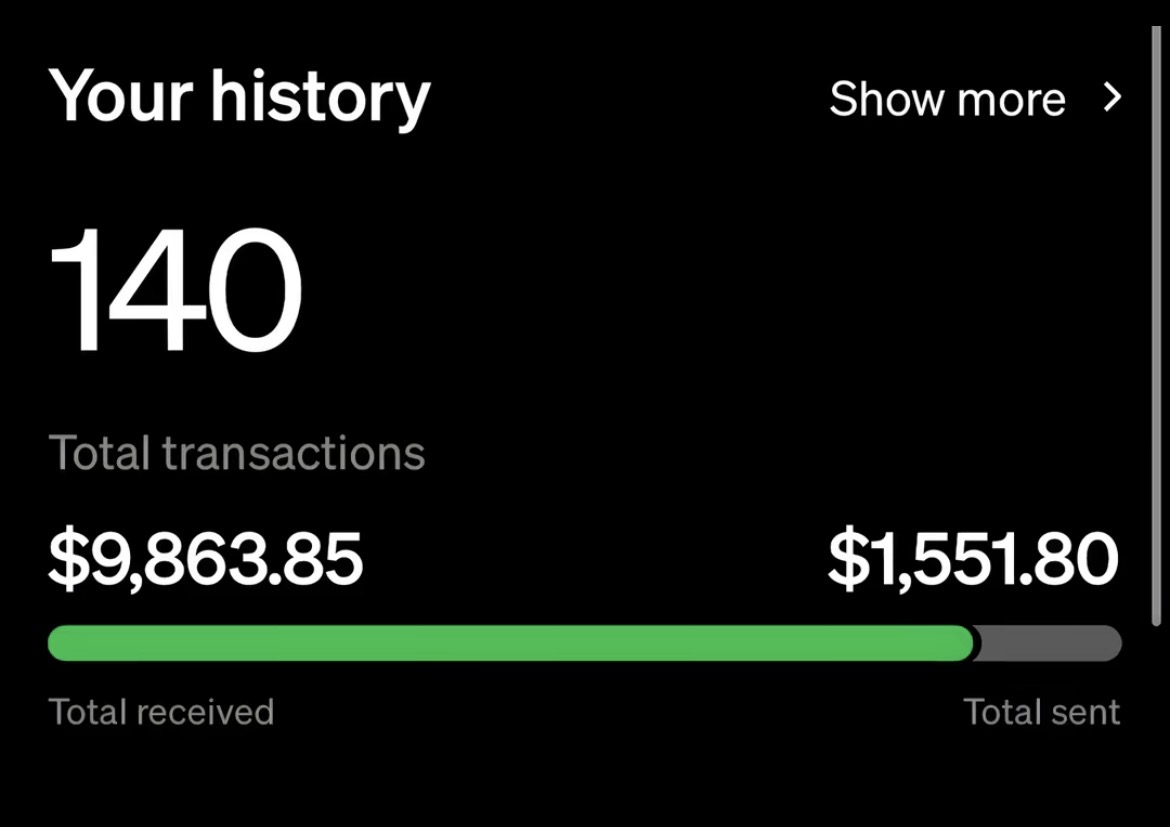


How, you may ask?(OR DNR)It’s easy, and you can do this as a teen, adult, or whatever age.
Disclaimer: With AI comes storage and memory shortages, so prices have shot up rapidly. Keep in mind that prices may vary.
A link to a full building tutorial will be down below.
STEP 1: THE PARTS
You will need a total of 7 items to build a PC.
1. The CPU
This is the brain of the operation. It handles all the thinking, calculations, and software instructions.
There are 5 platforms out there, but when you are building PCs, you are only gonna focus on two: AM4 and AM5. These are the most sought after.
2. The Motherboard
This is a giant circuit board where every single component plugs in so they can talk to each other.
Same with the CPU, there are 5 platforms of motherboards, but 2 are only really important.
There are multiple sizes of motherboards, but the two most common ones you will probably build with are either mATX (Micro ATX, which is smaller) and ATX (normal sized motherboard).
3. The RAM (Random Access Memory)
This is the short term memory. It essentially holds data like your tabs, games, or apps you have open when your PC is on so your PC doesn't stutter.
Same with the CPU and motherboard, you will focus on DDR4 and DDR5.
4. The SSD (Storage)
This is the long term memory, a storage drive where your operating system, games, and photos live permanently.
There are 3 types of storage: NVMe (fastest), SATA (2nd fastest, not as fast as NVMe), and HDD (slowest).
NVMes are the most sought after as they are the best for gaming. You will need these.
5. The GPU (Graphics Card)
It is essentially doing all the heavy lifting to render visuals, games, and 3D graphics on your screen. Very important.
6. The PSU (Power Supply)
This is ALSO one of the most important parts as it powers your whole system.
7. The Case
This houses all of your components. Different cases are labeled mATX or ATX, and this essentially tells you what motherboard can fit in which case.
STEP 2: BUYING PARTS (NEW VS. USED)
To ensure maximum profit, we will be shopping on the used market, although some parts you will have to buy new. Here is the breakdown:
Buy These New:
PSU: Never buy a used PSU. There is incredible risk involved; it could explode or fry all of your components.
Cooling Fans / CPU Cooler: If you are buying a liquid AIO (All In One) cooler with an internal pump, never buy it USED. Pumps have a mechanical lifespan and can leak fluid directly onto your electronics if the previous owner abused them. This will fuck over your components. Also, there are excellent normal CPU coolers for $20 or so.
Motherboard (Optional): If this is a new build, a new motherboard is essential. If it’s damaged, then you can’t really do anything because repair is very hard.
Case (Optional): There are very good cheap cases nowadays. It would be idiotic to not buy one new.
Fans (Optional): Your case should come with fans, but if you want to maximize airflow or looks, then I guess you could buy fans for cheap that perform well.
Although more RGB/better it looks the better it’ll sell.
Buy These Used:
CPU: You usually get the best deals on the used market. Just check for damages. If you want to spare a little more money, you can buy damaged AM4 CPUs and fix the pins yourself (it's fairly easy, I’ve done it myself). I will link this at the bottom.
RAM: Check if it’s not damaged and check the prices. If you find 32GB of DDR5 for under $300 or so, that’s a steal. For DDR4, 32GB under $120 is excellent for current prices.
GPU (THIS IS IMPORTANT): Graphics cards are the single biggest gray area on the market because they represent your largest potential savings but carry massive risk if you buy blind. Worn out visual processors can suffer from hidden issues like degraded thermal paste, failing fans, or dying VRAM modules that cause the card to throw visual artifacts or crash your games completely. If you buy a used GPU, only do so if the seller can provide a video or picture of the card successfully running a heavy benchmark loop, or if you are purchasing through a platform with bulletproof buyer protection (eBay for example). I’ve dealt with this in the past, I bought a $700 graphics card just to find out all the VRAM modules were removed.
SSD (Optional): With current storage prices, you could find some gems used, although I would be cautious with this one. If you find a seller, find out the drive health. If it’s below 98%, it’s not worth it. Try to buy 99%–100% if possible. Also, try to avoid Micron/Crucial as their warranty sucks and they will not replace shit if anything happens.
IMPORTANT FLIPPING STRATEGY: You could also buy used PCs by themselves, clean them up, maybe upgrade them, and sell them for more. For example, let’s say you find a PC for like $250 or so with good specs but no GPU. You could buy a used GPU for $200 and sell the whole PC for like $600–$800.
STEP 3: POST-BUILD & HOW TO SELL
Now that you are finished building the PC, you are ready to set it up and list it.
The Software Setup
You will want to install Windows. You can buy a cheap 3rd party key for $20 that’ll work just fine. Don't get scammed by Windows and spend $200 on a key.
The Physical and Digital Prep
Before you take a single photo, take the PC to an open space and make sure it looks as nice as possible. Use canned air if it’s dusty, and make sure to clean the glass panels until they are completely free of any marks. A dusty system instantly signals neglect to a potential buyer. Leave the machine sitting on the fresh, unlinked Windows setup screen so the new owner can walk in and plug it straight into their own account.
Capturing the Right Photos
Bad lighting and ugly reflections will kill your listing instantly. LITERALLY! THIS WILL KILL 99% OF YOUR SALES! Make the move to take your computer setup to a well lit room with natural light and turn off your camera flash to avoid harsh glares on the glass. Your main picture should be a straight on shot of the PC fully turned on with the side panel removed so the internal parts and spinning fans are highly visible. Take secondary shots of the front panel, the rear ports, a clear close up of the graphics card brand name, and then finally, snap a photo of a monitor screen displaying the system properties window to show proof of specs.
Writing a Clean Listing
When you post the PC, keep your title highly searchable. Avoid complication and stick to specs only. For example, some things I’ve used are: Gaming PC RTX 4070 / Ryzen 5 7600X / 32GB RAM. With the main description, just skip the long backstory about why you are moving on. Keep it professional by listing the specs, state that it features a totally clean install of Windows, and make sure it’s ready to plug and play.
Talking to Buyers and Staying Safe
The second your listing goes live, you will likely deal with lowballers, bots, and scammers. If someone sends a ridiculously low offer right out of the gate, ignore them or counter offer. If they try to switch off the platform you’re talking on, block them, they’re probably scamming you.
If you’re not shipping it and meeting up in person, be sure to be careful. Meet in a parking lot or a police station, and never give the buyer the PC until cash is in your hands or digital funds are fully cleared in your banking app. I can’t count the number of times I’ve almost got scammed when meeting in person.
Shipping Best Practices
If shipping, make sure to pack diligently and nicely. Use styrofoam to protect the sides, top, and bottom from any contact.
I would recommend removing the GPU entirely, but if you’re not, I would recommend stuffing the inside of the PC with static protected material or at least bracing the GPU extremely well to prevent objects from moving around during shipping ideally (or just have your buyer install the GPU separately to prevent damage). Look into expanding foam of some kind that you can fill the PC with for protection, and you could fill the edges of a box between that and the PC.
HOW TO BUILD THE PC
FIXING AM4 CPUS
So here it is
GUIDE TO PC BUILDING: EARN MONEY EASILY
I earned a little over 12000 dollars from flipping PCs these past 6 months.
How, you may ask?(OR DNR)It’s easy, and you can do this as a teen, adult, or whatever age.
Disclaimer: With AI comes storage and memory shortages, so prices have shot up rapidly. Keep in mind that prices may vary.
A link to a full building tutorial will be down below.
STEP 1: THE PARTS
You will need a total of 7 items to build a PC.
1. The CPU
This is the brain of the operation. It handles all the thinking, calculations, and software instructions.
There are 5 platforms out there, but when you are building PCs, you are only gonna focus on two: AM4 and AM5. These are the most sought after.
2. The Motherboard
This is a giant circuit board where every single component plugs in so they can talk to each other.
Same with the CPU, there are 5 platforms of motherboards, but 2 are only really important.
There are multiple sizes of motherboards, but the two most common ones you will probably build with are either mATX (Micro ATX, which is smaller) and ATX (normal sized motherboard).
3. The RAM (Random Access Memory)
This is the short term memory. It essentially holds data like your tabs, games, or apps you have open when your PC is on so your PC doesn't stutter.
Same with the CPU and motherboard, you will focus on DDR4 and DDR5.
4. The SSD (Storage)
This is the long term memory, a storage drive where your operating system, games, and photos live permanently.
There are 3 types of storage: NVMe (fastest), SATA (2nd fastest, not as fast as NVMe), and HDD (slowest).
NVMes are the most sought after as they are the best for gaming. You will need these.
5. The GPU (Graphics Card)
It is essentially doing all the heavy lifting to render visuals, games, and 3D graphics on your screen. Very important.
6. The PSU (Power Supply)
This is ALSO one of the most important parts as it powers your whole system.
7. The Case
This houses all of your components. Different cases are labeled mATX or ATX, and this essentially tells you what motherboard can fit in which case.
STEP 2: BUYING PARTS (NEW VS. USED)
To ensure maximum profit, we will be shopping on the used market, although some parts you will have to buy new. Here is the breakdown:
Buy These New:
PSU: Never buy a used PSU. There is incredible risk involved; it could explode or fry all of your components.
Cooling Fans / CPU Cooler: If you are buying a liquid AIO (All In One) cooler with an internal pump, never buy it USED. Pumps have a mechanical lifespan and can leak fluid directly onto your electronics if the previous owner abused them. This will fuck over your components. Also, there are excellent normal CPU coolers for $20 or so.
Motherboard (Optional): If this is a new build, a new motherboard is essential. If it’s damaged, then you can’t really do anything because repair is very hard.
Case (Optional): There are very good cheap cases nowadays. It would be idiotic to not buy one new.
Fans (Optional): Your case should come with fans, but if you want to maximize airflow or looks, then I guess you could buy fans for cheap that perform well.
Although more RGB/better it looks the better it’ll sell.
Buy These Used:
CPU: You usually get the best deals on the used market. Just check for damages. If you want to spare a little more money, you can buy damaged AM4 CPUs and fix the pins yourself (it's fairly easy, I’ve done it myself). I will link this at the bottom.
RAM: Check if it’s not damaged and check the prices. If you find 32GB of DDR5 for under $300 or so, that’s a steal. For DDR4, 32GB under $120 is excellent for current prices.
GPU (THIS IS IMPORTANT): Graphics cards are the single biggest gray area on the market because they represent your largest potential savings but carry massive risk if you buy blind. Worn out visual processors can suffer from hidden issues like degraded thermal paste, failing fans, or dying VRAM modules that cause the card to throw visual artifacts or crash your games completely. If you buy a used GPU, only do so if the seller can provide a video or picture of the card successfully running a heavy benchmark loop, or if you are purchasing through a platform with bulletproof buyer protection (eBay for example). I’ve dealt with this in the past, I bought a $700 graphics card just to find out all the VRAM modules were removed.
SSD (Optional): With current storage prices, you could find some gems used, although I would be cautious with this one. If you find a seller, find out the drive health. If it’s below 98%, it’s not worth it. Try to buy 99%–100% if possible. Also, try to avoid Micron/Crucial as their warranty sucks and they will not replace shit if anything happens.
IMPORTANT FLIPPING STRATEGY: You could also buy used PCs by themselves, clean them up, maybe upgrade them, and sell them for more. For example, let’s say you find a PC for like $250 or so with good specs but no GPU. You could buy a used GPU for $200 and sell the whole PC for like $600–$800.
STEP 3: POST-BUILD & HOW TO SELL
Now that you are finished building the PC, you are ready to set it up and list it.
The Software Setup
You will want to install Windows. You can buy a cheap 3rd party key for $20 that’ll work just fine. Don't get scammed by Windows and spend $200 on a key.
The Physical and Digital Prep
Before you take a single photo, take the PC to an open space and make sure it looks as nice as possible. Use canned air if it’s dusty, and make sure to clean the glass panels until they are completely free of any marks. A dusty system instantly signals neglect to a potential buyer. Leave the machine sitting on the fresh, unlinked Windows setup screen so the new owner can walk in and plug it straight into their own account.
Capturing the Right Photos
Bad lighting and ugly reflections will kill your listing instantly. LITERALLY! THIS WILL KILL 99% OF YOUR SALES! Make the move to take your computer setup to a well lit room with natural light and turn off your camera flash to avoid harsh glares on the glass. Your main picture should be a straight on shot of the PC fully turned on with the side panel removed so the internal parts and spinning fans are highly visible. Take secondary shots of the front panel, the rear ports, a clear close up of the graphics card brand name, and then finally, snap a photo of a monitor screen displaying the system properties window to show proof of specs.
Writing a Clean Listing
When you post the PC, keep your title highly searchable. Avoid complication and stick to specs only. For example, some things I’ve used are: Gaming PC RTX 4070 / Ryzen 5 7600X / 32GB RAM. With the main description, just skip the long backstory about why you are moving on. Keep it professional by listing the specs, state that it features a totally clean install of Windows, and make sure it’s ready to plug and play.
Talking to Buyers and Staying Safe
The second your listing goes live, you will likely deal with lowballers, bots, and scammers. If someone sends a ridiculously low offer right out of the gate, ignore them or counter offer. If they try to switch off the platform you’re talking on, block them, they’re probably scamming you.
If you’re not shipping it and meeting up in person, be sure to be careful. Meet in a parking lot or a police station, and never give the buyer the PC until cash is in your hands or digital funds are fully cleared in your banking app. I can’t count the number of times I’ve almost got scammed when meeting in person.
Shipping Best Practices
If shipping, make sure to pack diligently and nicely. Use styrofoam to protect the sides, top, and bottom from any contact.
I would recommend removing the GPU entirely, but if you’re not, I would recommend stuffing the inside of the PC with static protected material or at least bracing the GPU extremely well to prevent objects from moving around during shipping ideally (or just have your buyer install the GPU separately to prevent damage). Look into expanding foam of some kind that you can fill the PC with for protection, and you could fill the edges of a box between that and the PC.
HOW TO BUILD THE PC
FIXING AM4 CPUS


