
How to measure your ratios - 3 FREE tools

keepswimming

keepswimming

Platinum
Joined
Jul 5, 2025
Posts
1,150
Reputation
2,132
In this guide I will present you 3 Websites where you can either measure your ratios on your own or where markers get placed automatically.

But first you have to know how to make a good picture to minimize lens distortion.

There are two reliable methods.
Both have to be done in natural lighting and with a natural facial expression.

Front profile:

1.With mirror


  • stand 1m away from the mirror
  • hold your phone upright next to your head so your camera is next to your eyes
  • look into the camera through the mirror

2.Without mirror
  • put 10 second timer on the back camera
  • place phone on a table held against a wall or another stable structure with backcam pointed at you
  • press volume button to trigger the timer (don't know if this works for androidcels)
  • get 2 meters away and look into the camera

Side profile:

  • basically all of the above except form a side view. I do them with a three way mirror it's way easier with it.
  • beware that you shouldn't be able to see the other eyebrow that is a great indicator if you are really seeing your side profile.

Now finally to the websites

1. Ascendbase Ratios

https://ratios-calculator.ascendbase.pro/


This was made by @Dastan a while ago but I don't see it getting popular anytime soon with his marketing skills.

It doesn't place the markers for you but is the only one here where you can also measure your side profile. Beware that the overall ratio rating here tends to overrate a bit. A rating form ratio calculators is not your actual rating.(should be completely obvious but rock eaters like @comingthrough might not get that)

Here is a tutorial from Dastan himself about how use the front profile analyzer.


https://www.youtube.com/watch?v=9L6rcIIS46Q


2. Glowometry
https://glowometry.com/


This one places markers automatically but not that reliably. Only front profile tho.
You can edit the placed markers so it still makes sense to use it. This one was made by @Leon T .

3. Incel.Solutions
https://incel.solutions/


This one is probably the most known here and is pretty good from my experience. It places the markers reliably but you can move them if they get placed wrong.

@Akademik_Komarov @mohi_100 @3ahairprettyboy


This was my first thread so don't be too harsh on me.:trepidation:

 
  • +1
Reactions: xzylecrey, EthiopianMaxxer, reda2010 and 25 others
Elite thread with amazing info. More users should measure their own ratios instead of mindlessly asking for ratings.
 
  • +1
Reactions: xzylecrey, remusss, qxdr and 6 others
Elite thread with amazing info. More users should measure their own ratios instead of mindlessly asking for ratings.
should really be the first thing to do and Tiktokcels even pay for it.
 
  • +1
Reactions: Micrognathic, Tensor, el hit and 2 others
Really good first thread bhai 👌❤️
 
  • +1
Reactions: ltnbrownacnecel, el hit and Tensor
Tiktokcels even pay for it.
just make tiktok bp edits and once you get a big enough following, get sponsored by jawmax and umax and sell a service to rate people (using free tools ) :lul:
 
  • JFL
  • +1
Reactions: ltnbrownacnecel, Ldar09867, el hit and 2 others
In this guide I will present you 3 Websites where you can either measure your ratios on your own or where markers get placed automatically.

But first you have to know how to make a good picture to minimize lens distortion.


There are two reliable methods.
Both have to be done in natural lighting and with a natural facial expression.

Front profile:

1.With mirror


  • stand 1m away from the mirror
  • hold your phone upright next to your head so your camera is next to your eyes
  • look into the camera through the mirror

2.Without mirror
  • put 10 second timer on the back camera
  • place phone on a table held against a wall or another stable structure with backcam pointed at you
  • press volume button to trigger the timer (don't know if this works for androidcels)
  • get 2 meters away and look into the camera

Side profile:

  • basically all of the above except form a side view. I do them with a three way mirror it's way easier with it.
  • beware that you shouldn't be able to see the other eyebrow that is a great indicator if you are really seeing your side profile.

Now finally to the websites

1. Ascendbase Ratios

https://ratios-calculator.ascendbase.pro/


This was made by @Dastan a while ago but I don't see it getting popular anytime soon with his marketing skills.

It doesn't place the markers for you but is the only one here where you can also measure your side profile. Beware that the overall ratio rating here tends to overrate a bit. A rating form ratio calculators is not your actual rating.(should be completely obvious but rock eaters like @comingthrough might not get that)

Here is a tutorial from Dastan himself about how use the front profile analyzer.


https://www.youtube.com/watch?v=9L6rcIIS46Q


2. Glowometry
https://glowometry.com/


This one places markers automatically but not that reliably. Only front profile tho.
You can edit the placed markers so it still makes sense to use it. This one was made by @Leon T .

3. Incel.Solutions
https://incel.solutions/


This one is probably the most known here and is pretty good from my experience. It places the markers reliably but you can move them if they get placed wrong.

@Akademik_Komarov @mohi_100 @3ahairprettyboy


This was my first thread so don't be too harsh on me.:trepidation:
And then there is faceiq wanting like 50 bucks for his algorithm to do a couple divisions
 
Last edited:
  • +1
Reactions: Micrognathic, KeepCopingLads, ltnbrownacnecel and 1 other person
great thread. mirin
 
  • +1
Reactions: mohi_100, Ldar09867 and Tensor
In this guide I will present you 3 Websites where you can either measure your ratios on your own or where markers get placed automatically.

But first you have to know how to make a good picture to minimize lens distortion.


There are two reliable methods.
Both have to be done in natural lighting and with a natural facial expression.

Front profile:

1.With mirror


  • stand 1m away from the mirror
  • hold your phone upright next to your head so your camera is next to your eyes
  • look into the camera through the mirror

2.Without mirror
  • put 10 second timer on the back camera
  • place phone on a table held against a wall or another stable structure with backcam pointed at you
  • press volume button to trigger the timer (don't know if this works for androidcels)
  • get 2 meters away and look into the camera

Side profile:

  • basically all of the above except form a side view. I do them with a three way mirror it's way easier with it.
  • beware that you shouldn't be able to see the other eyebrow that is a great indicator if you are really seeing your side profile.

Now finally to the websites

1. Ascendbase Ratios

https://ratios-calculator.ascendbase.pro/


This was made by @Dastan a while ago but I don't see it getting popular anytime soon with his marketing skills.

It doesn't place the markers for you but is the only one here where you can also measure your side profile. Beware that the overall ratio rating here tends to overrate a bit. A rating form ratio calculators is not your actual rating.(should be completely obvious but rock eaters like @comingthrough might not get that)

Here is a tutorial from Dastan himself about how use the front profile analyzer.


https://www.youtube.com/watch?v=9L6rcIIS46Q


2. Glowometry
https://glowometry.com/


This one places markers automatically but not that reliably. Only front profile tho.
You can edit the placed markers so it still makes sense to use it. This one was made by @Leon T .

3. Incel.Solutions
https://incel.solutions/


This one is probably the most known here and is pretty good from my experience. It places the markers reliably but you can move them if they get placed wrong.

@Akademik_Komarov @mohi_100 @3ahairprettyboy


This was my first thread so don't be too harsh on me.:trepidation:
Good thread knowing ur ratios is crucial for determining ur flaws and surgeries needed.
 
  • +1
Reactions: Leon T, el hit, Cinnamon fan64 and 2 others
just make tiktok bp edits and once you get a big enough following, get sponsored by jawmax and umax and sell a service to rate people (using free tools ) :lul:
i might genuinly do this :feelsmega: only if financial situation gets more fucked
 
  • +1
Reactions: el hit, mohi_100, Cinnamon fan64 and 1 other person
In this guide I will present you 3 Websites where you can either measure your ratios on your own or where markers get placed automatically.

But first you have to know how to make a good picture to minimize lens distortion.


There are two reliable methods.
Both have to be done in natural lighting and with a natural facial expression.

Front profile:

1.With mirror


  • stand 1m away from the mirror
  • hold your phone upright next to your head so your camera is next to your eyes
  • look into the camera through the mirror

2.Without mirror
  • put 10 second timer on the back camera
  • place phone on a table held against a wall or another stable structure with backcam pointed at you
  • press volume button to trigger the timer (don't know if this works for androidcels)
  • get 2 meters away and look into the camera

Side profile:

  • basically all of the above except form a side view. I do them with a three way mirror it's way easier with it.
  • beware that you shouldn't be able to see the other eyebrow that is a great indicator if you are really seeing your side profile.

Now finally to the websites

1. Ascendbase Ratios

https://ratios-calculator.ascendbase.pro/


This was made by @Dastan a while ago but I don't see it getting popular anytime soon with his marketing skills.

It doesn't place the markers for you but is the only one here where you can also measure your side profile. Beware that the overall ratio rating here tends to overrate a bit. A rating form ratio calculators is not your actual rating.(should be completely obvious but rock eaters like @comingthrough might not get that)

Here is a tutorial from Dastan himself about how use the front profile analyzer.


https://www.youtube.com/watch?v=9L6rcIIS46Q


2. Glowometry
https://glowometry.com/


This one places markers automatically but not that reliably. Only front profile tho.
You can edit the placed markers so it still makes sense to use it. This one was made by @Leon T .

3. Incel.Solutions
https://incel.solutions/


This one is probably the most known here and is pretty good from my experience. It places the markers reliably but you can move them if they get placed wrong.

@Akademik_Komarov @mohi_100 @3ahairprettyboy


This was my first thread so don't be too harsh on me.:trepidation:
i thought you would show tools to actually measure ratios yourself
if its automatic mapping then its gonna be inaccurate
 
Last edited:
  • +1
Reactions: xzylecrey, keepswimming and el hit
But like why? not saying your wrong you might be right but why arent they accurate
 
  • +1
Reactions: Cinnamon fan64
Elite thread with amazing info. More users should measure their own ratios instead of mindlessly asking for ratings.
I think when users ask for rating they don't just want harmony

Harmony only is not enough to give a rating
 
  • +1
Reactions: Cinnamon fan64
But like why? not saying your wrong you might be right but why arent they accurate

you mean when I said this
This one places markers automatically but not that reliably.
I just meant that this one tool doesn't always put the markers correctly based on my experience. You can move them freely to correct them tho.
 
  • +1
Reactions: Cinnamon fan64 and mohi_100
Good thread OP this is what the forum is for
 
  • +1
Reactions: Cinnamon fan64, Micrognathic and keepswimming
I think when users ask for rating they don't just want harmony

Harmony only is not enough to give a rating
It's a start. Harmony is not your complete rating like I said in the thread but measuring ratios is a great way to evaluate looks without having to show your face to someone.
 
  • +1
Reactions: Cinnamon fan64 and extractor
In this guide I will present you 3 Websites where you can either measure your ratios on your own or where markers get placed automatically.

But first you have to know how to make a good picture to minimize lens distortion.


There are two reliable methods.
Both have to be done in natural lighting and with a natural facial expression.

Front profile:

1.With mirror


  • stand 1m away from the mirror
  • hold your phone upright next to your head so your camera is next to your eyes
  • look into the camera through the mirror

2.Without mirror
  • put 10 second timer on the back camera
  • place phone on a table held against a wall or another stable structure with backcam pointed at you
  • press volume button to trigger the timer (don't know if this works for androidcels)
  • get 2 meters away and look into the camera

Side profile:

  • basically all of the above except form a side view. I do them with a three way mirror it's way easier with it.
  • beware that you shouldn't be able to see the other eyebrow that is a great indicator if you are really seeing your side profile.

Now finally to the websites

1. Ascendbase Ratios

https://ratios-calculator.ascendbase.pro/


This was made by @Dastan a while ago but I don't see it getting popular anytime soon with his marketing skills.

It doesn't place the markers for you but is the only one here where you can also measure your side profile. Beware that the overall ratio rating here tends to overrate a bit. A rating form ratio calculators is not your actual rating.(should be completely obvious but rock eaters like @comingthrough might not get that)

Here is a tutorial from Dastan himself about how use the front profile analyzer.


https://www.youtube.com/watch?v=9L6rcIIS46Q


2. Glowometry
https://glowometry.com/


This one places markers automatically but not that reliably. Only front profile tho.
You can edit the placed markers so it still makes sense to use it. This one was made by @Leon T .

3. Incel.Solutions
https://incel.solutions/


This one is probably the most known here and is pretty good from my experience. It places the markers reliably but you can move them if they get placed wrong.

@Akademik_Komarov @mohi_100 @3ahairprettyboy


This was my first thread so don't be too harsh on me.:trepidation:
good shit, mirin’:love:
 
  • +1
Reactions: Cinnamon fan64 and keepswimming
View attachment 1765827562304.png
1765827714919
 
  • JFL
  • +1
Reactions: Cinnamon fan64, Histy, mohi_100 and 1 other person
bump
 
  • +1
Reactions: Cinnamon fan64
mirin hard 😍
 
  • +1
Reactions: Cinnamon fan64, mohi_100 and keepswimming
does incel solutions overrate? i done measurements with my normal face and with a very very realistic morph of post surgery and i went from upper normie to chadlite
 
  • +1
Reactions: Cinnamon fan64 and mohi_100
does incel solutions overrate? i done measurements with my normal face and with a very very realistic morph of post surgery and i went from upper normie to chadlite
don't think so it's rather known
 
  • +1
Reactions: Cinnamon fan64, mohi_100 and zygosmasher12
In this guide I will present you 3 Websites where you can either measure your ratios on your own or where markers get placed automatically.

But first you have to know how to make a good picture to minimize lens distortion.


There are two reliable methods.
Both have to be done in natural lighting and with a natural facial expression.

Front profile:

1.With mirror


  • stand 1m away from the mirror
  • hold your phone upright next to your head so your camera is next to your eyes
  • look into the camera through the mirror

2.Without mirror
  • put 10 second timer on the back camera
  • place phone on a table held against a wall or another stable structure with backcam pointed at you
  • press volume button to trigger the timer (don't know if this works for androidcels)
  • get 2 meters away and look into the camera

Side profile:

  • basically all of the above except form a side view. I do them with a three way mirror it's way easier with it.
  • beware that you shouldn't be able to see the other eyebrow that is a great indicator if you are really seeing your side profile.

Now finally to the websites

1. Ascendbase Ratios

https://ratios-calculator.ascendbase.pro/


This was made by @Dastan a while ago but I don't see it getting popular anytime soon with his marketing skills.

It doesn't place the markers for you but is the only one here where you can also measure your side profile. Beware that the overall ratio rating here tends to overrate a bit. A rating form ratio calculators is not your actual rating.(should be completely obvious but rock eaters like @comingthrough might not get that)

Here is a tutorial from Dastan himself about how use the front profile analyzer.


https://www.youtube.com/watch?v=9L6rcIIS46Q


2. Glowometry
https://glowometry.com/


This one places markers automatically but not that reliably. Only front profile tho.
You can edit the placed markers so it still makes sense to use it. This one was made by @Leon T .

3. Incel.Solutions
https://incel.solutions/


This one is probably the most known here and is pretty good from my experience. It places the markers reliably but you can move them if they get placed wrong.

@Akademik_Komarov @mohi_100 @3ahairprettyboy


This was my first thread so don't be too harsh on me.:trepidation:

Thanks for the shoutout, I've added a basic side profile analyser now. Theres a few things with the UX on certain ratios that I currently don't like so have limited it to the most basic ratios.

Interesting that you say it doesn't place the landmarks that accurately since it uses a better model than incel.solutions, I'll take a look to figure out why that is happening.
 
  • +1
Reactions: Cinnamon fan64 and keepswimming
Bookmarked , using it later :Comfi:
 
  • +1
Reactions: Cinnamon fan64
Thanks for the shoutout, I've added a basic side profile analyser now. Theres a few things with the UX on certain ratios that I currently don't like so have limited it to the most basic ratios.

Interesting that you say it doesn't place the landmarks that accurately since it uses a better model than incel.solutions, I'll take a look to figure out why that is happening.
Only my own experience and the layout for editing the markers was a bit hidden the last time I looked at it. Nonetheless it’s a great free tool and I appreciate it.
 
  • Love it
  • +1
Reactions: Cinnamon fan64 and Leon T
Great thread :D
repped
 
  • +1
Reactions: Cinnamon fan64
Elite thread with amazing info. More users should measure their own ratios instead of mindlessly asking for ratings.
fax bru
 
  • +1
Reactions: Cinnamon fan64, keepswimming and mohi_100
i thought you would show tools to actually measure ratios yourself
if its automatic mapping then its gonna be inaccurate
Ascendbase Ratios is manual and I personally like manual mapping more
 
  • +1
Reactions: Cinnamon fan64
In this guide I will present you 3 Websites where you can either measure your ratios on your own or where markers get placed automatically.

But first you have to know how to make a good picture to minimize lens distortion.


There are two reliable methods.
Both have to be done in natural lighting and with a natural facial expression.

Front profile:

1.With mirror


  • stand 1m away from the mirror
  • hold your phone upright next to your head so your camera is next to your eyes
  • look into the camera through the mirror

2.Without mirror
  • put 10 second timer on the back camera
  • place phone on a table held against a wall or another stable structure with backcam pointed at you
  • press volume button to trigger the timer (don't know if this works for androidcels)
  • get 2 meters away and look into the camera

Side profile:

  • basically all of the above except form a side view. I do them with a three way mirror it's way easier with it.
  • beware that you shouldn't be able to see the other eyebrow that is a great indicator if you are really seeing your side profile.

Now finally to the websites

1. Ascendbase Ratios

https://ratios-calculator.ascendbase.pro/


This was made by @Dastan a while ago but I don't see it getting popular anytime soon with his marketing skills.

It doesn't place the markers for you but is the only one here where you can also measure your side profile. Beware that the overall ratio rating here tends to overrate a bit. A rating form ratio calculators is not your actual rating.(should be completely obvious but rock eaters like @comingthrough might not get that)

Here is a tutorial from Dastan himself about how use the front profile analyzer.


https://www.youtube.com/watch?v=9L6rcIIS46Q


2. Glowometry
https://glowometry.com/


This one places markers automatically but not that reliably. Only front profile tho.
You can edit the placed markers so it still makes sense to use it. This one was made by @Leon T .

3. Incel.Solutions
https://incel.solutions/


This one is probably the most known here and is pretty good from my experience. It places the markers reliably but you can move them if they get placed wrong.

@Akademik_Komarov @mohi_100 @3ahairprettyboy


This was my first thread so don't be too harsh on me.:trepidation:
Amazing for a first thread
 
  • Love it
Reactions: keepswimming
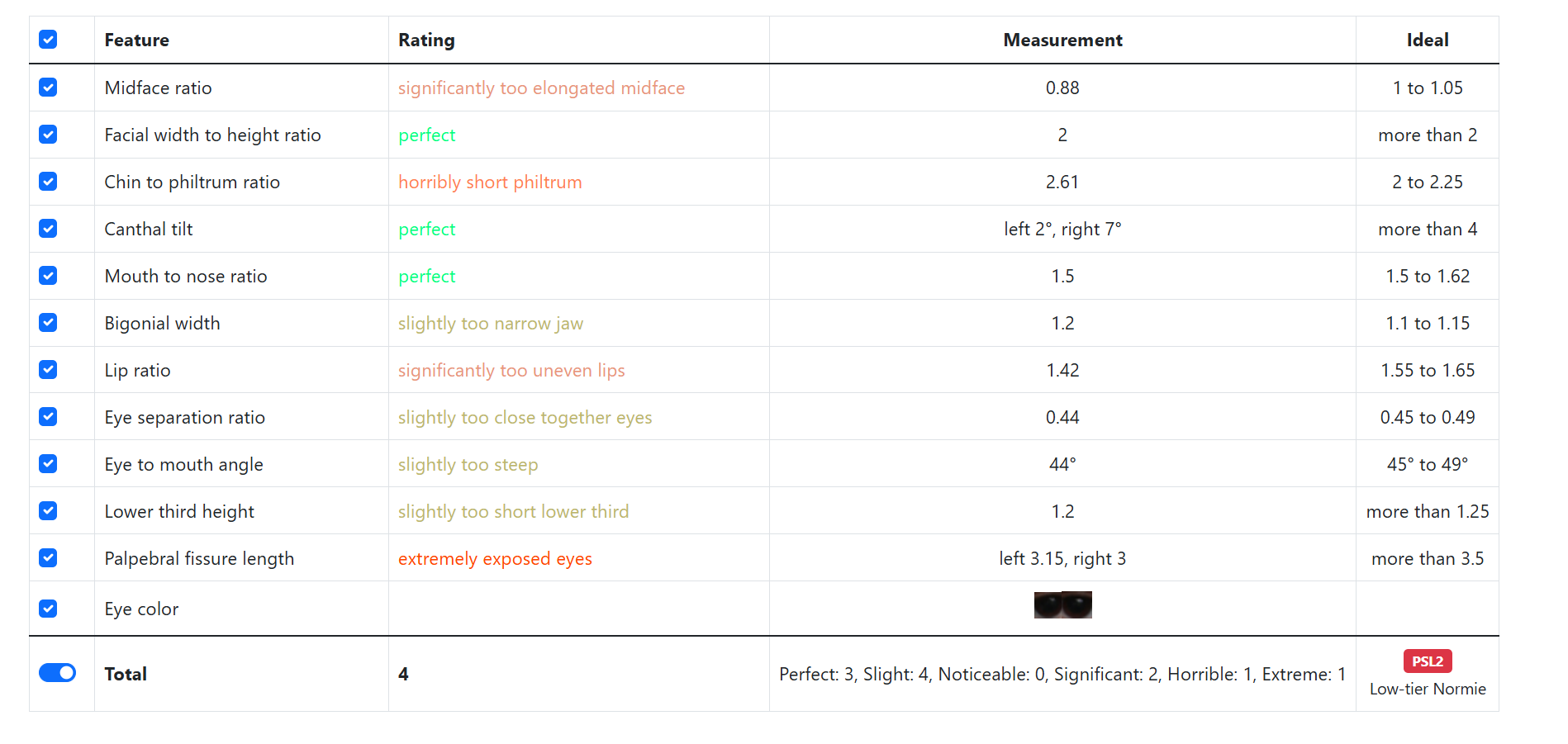
There's no way incel solutions said my ratios were psl 1
 
  • +1
Reactions: keepswimming
There's no way incel solutions said my ratios were psl 1
I know better now it’s garbage like any automatic marker placement calculator
Use ascendbase and do it yourself
 
And then there is faceiq wanting like 50 bucks for his algorithm to do a couple divisions
Its way more accurate, i get different outcomes on every single website and they measure man ratio wrong
 

Similar threads

W
Replies
9
Views
1K
narrator_313
narrator_313
insignia_
Replies
70
Views
961
O'bhai
O'bhai
sussy baka88
Replies
7
Views
717
Jus_Kev
Jus_Kev

Users who are viewing this thread

  • eli1
Back
Top