





Gravitas
Previously known as LTNhell63
- Joined
- Jan 29, 2026
- Posts
- 5,448
- Reputation
- 15,232
Whats up boyos
I’m seeing too many threads here where dalits post their ratings requests or progress pics, completely oblivious to the fact that they are basically giving away their home address to everyone
Every time you take a photo with your phone, your camera attaches a hidden file called EXIF data. It doesn't just save your image, it saves your exact GPS coordinates, the altitude, the exact time and your phone model.
If you upload that file here in .org(site that doesn't automatically strip metadata)
anyone can download your pic, drop it into an EXIF viewer, and find out exactly where you live and its over.
so here are 3 methods to prevent this:
METHOD 1
Go to Camera → Settings → Location tags / Save location and turn it off
iPhone
Settings → Privacy & Security → Location Services → Camera and set it to Never
METHOD 2
Go to:
https://www.exifdata.com/
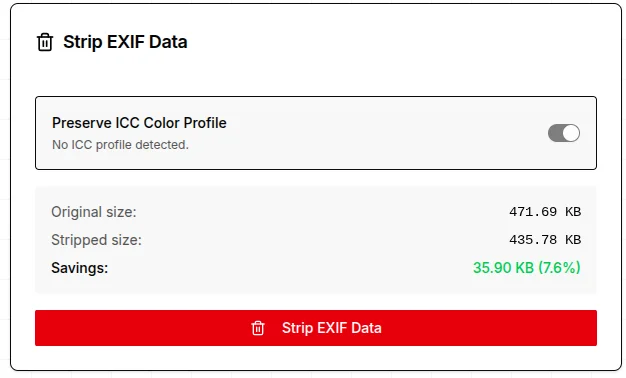
drop the image you want to remove exif data from or inspect the exif data
scroll down till you find this:
METHOD 3
Go to your camera roll and take a screenshot of the pic you want to upload
(Crop the damn screenshot before posting)
And then upload the ss
Thats all
See ya soon boyos.
@Idontknow- @Subhuman @Panchitosbroncs @Scandi. @Big Boss
I’m seeing too many threads here where dalits post their ratings requests or progress pics, completely oblivious to the fact that they are basically giving away their home address to everyone
Every time you take a photo with your phone, your camera attaches a hidden file called EXIF data. It doesn't just save your image, it saves your exact GPS coordinates, the altitude, the exact time and your phone model.
If you upload that file here in .org(site that doesn't automatically strip metadata)
anyone can download your pic, drop it into an EXIF viewer, and find out exactly where you live and its over.
so here are 3 methods to prevent this:
METHOD 1
Go to Camera → Settings → Location tags / Save location and turn it off
iPhone
Settings → Privacy & Security → Location Services → Camera and set it to Never
METHOD 2
Go to:
https://www.exifdata.com/
drop the image you want to remove exif data from or inspect the exif data
scroll down till you find this:
METHOD 3
Go to your camera roll and take a screenshot of the pic you want to upload
(Crop the damn screenshot before posting)
And then upload the ss
Thats all
See ya soon boyos.
@Idontknow- @Subhuman @Panchitosbroncs @Scandi. @Big Boss