



slayer69
Forum Advisor
- Joined
- Mar 9, 2020
- Posts
- 11,395
- Reputation
- 13,283
Hello Looksmaxx.org, Welcome to this Tutorial
so today we are going to learn how to go from looksmaxx to looksmaxx dark mode if you are using looksmaxx mode and how to go from looksmaxx dark to looksmax if you are using looksmaxx dark mode
step 1.
identify your current UI.
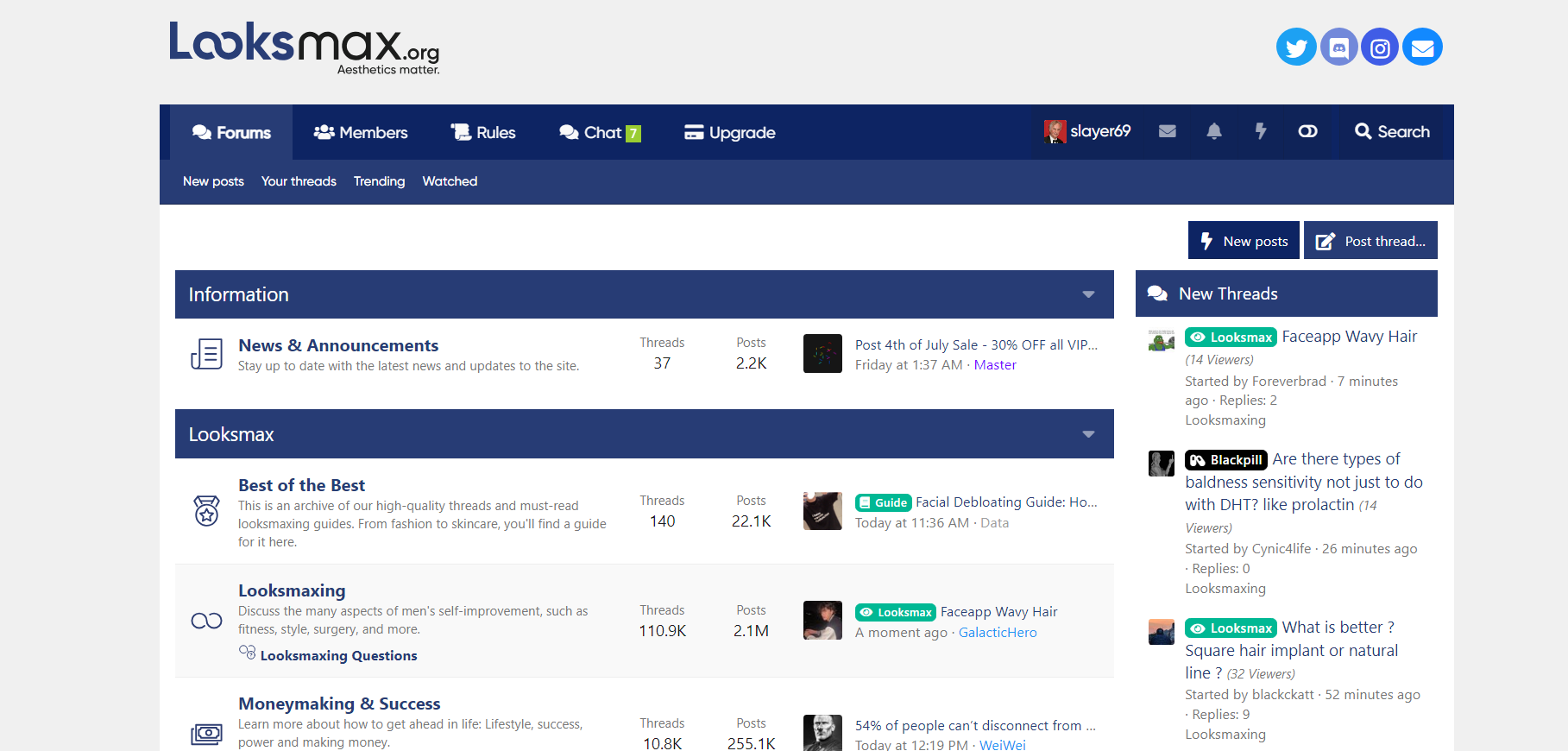
Looking at this I identified my Current UI as Looksmaxx
Step 2.
Locate the LIGHT SWITCH BUTTON.
it is at the top right corner, next to the search bar


Step 3,
Click on THE LIGHT SWITCH TOGGLE button and SWITCH to your preferred mode!

There you go!
thank you for reading this tutorial.

so today we are going to learn how to go from looksmaxx to looksmaxx dark mode if you are using looksmaxx mode and how to go from looksmaxx dark to looksmax if you are using looksmaxx dark mode
step 1.
identify your current UI.
Looking at this I identified my Current UI as Looksmaxx
Step 2.
Locate the LIGHT SWITCH BUTTON.
it is at the top right corner, next to the search bar
Step 3,
Click on THE LIGHT SWITCH TOGGLE button and SWITCH to your preferred mode!
There you go!
thank you for reading this tutorial.