

How to insert videos in posts/threads

ØUROBOROS

ØUROBOROS

Htn incoming.
Joined
Dec 25, 2025
Posts
7,244
Reputation
13,205
Well I have seen a lot of users don't know how for some reason so I'm here to teach you how.


First you click on the Attach files button
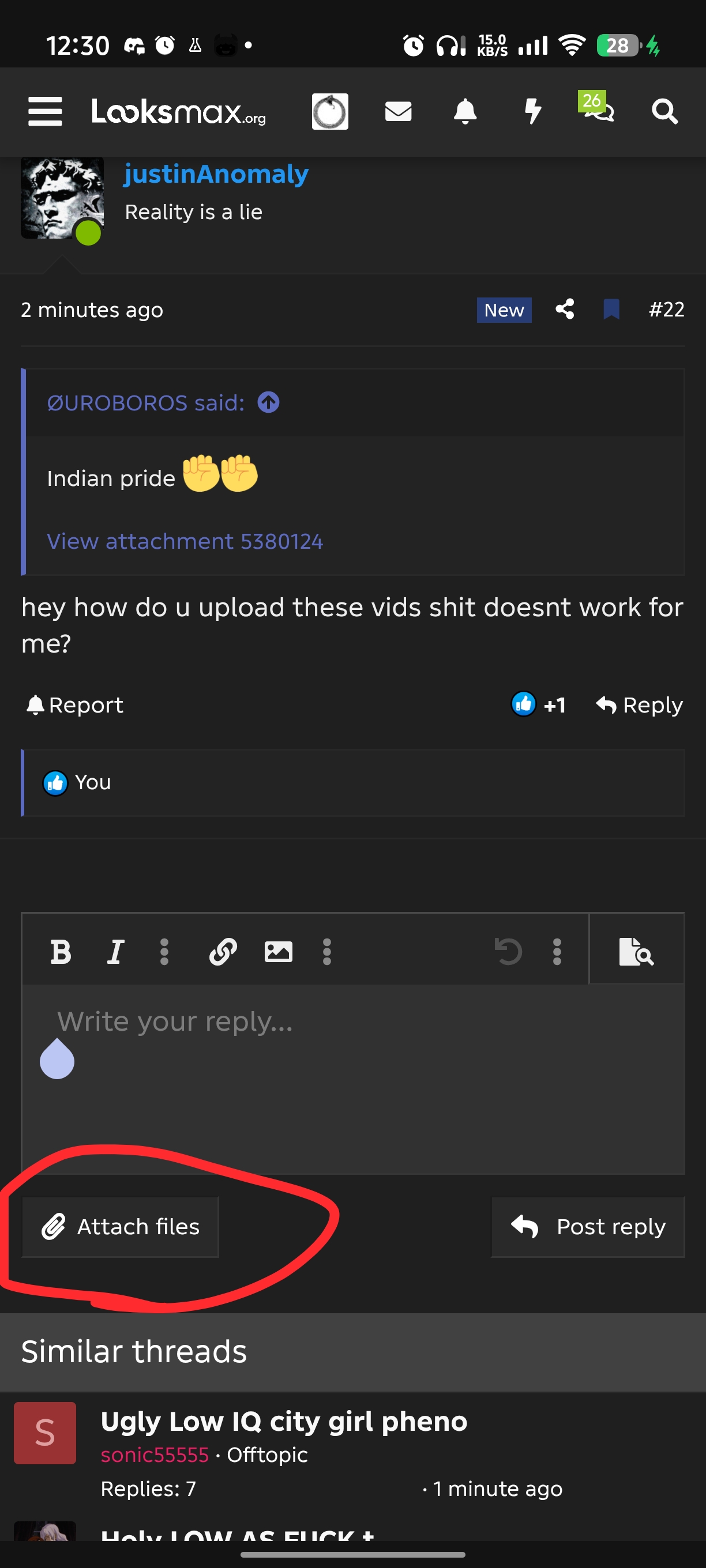
39594


Then you click on your files app or whatever you have instead of it for videos (you can press the recorder for voice notes)
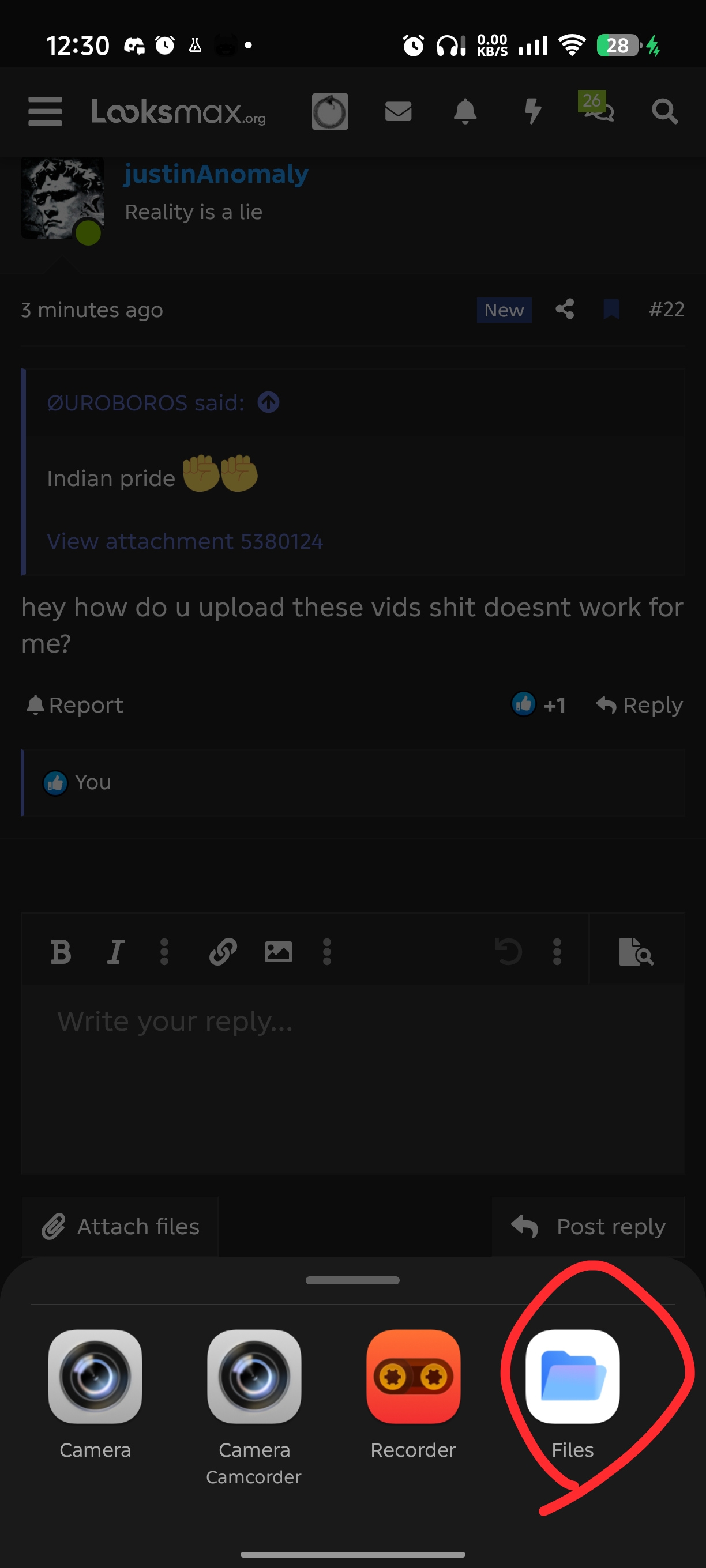
39596

Then you press the video that you want to insert
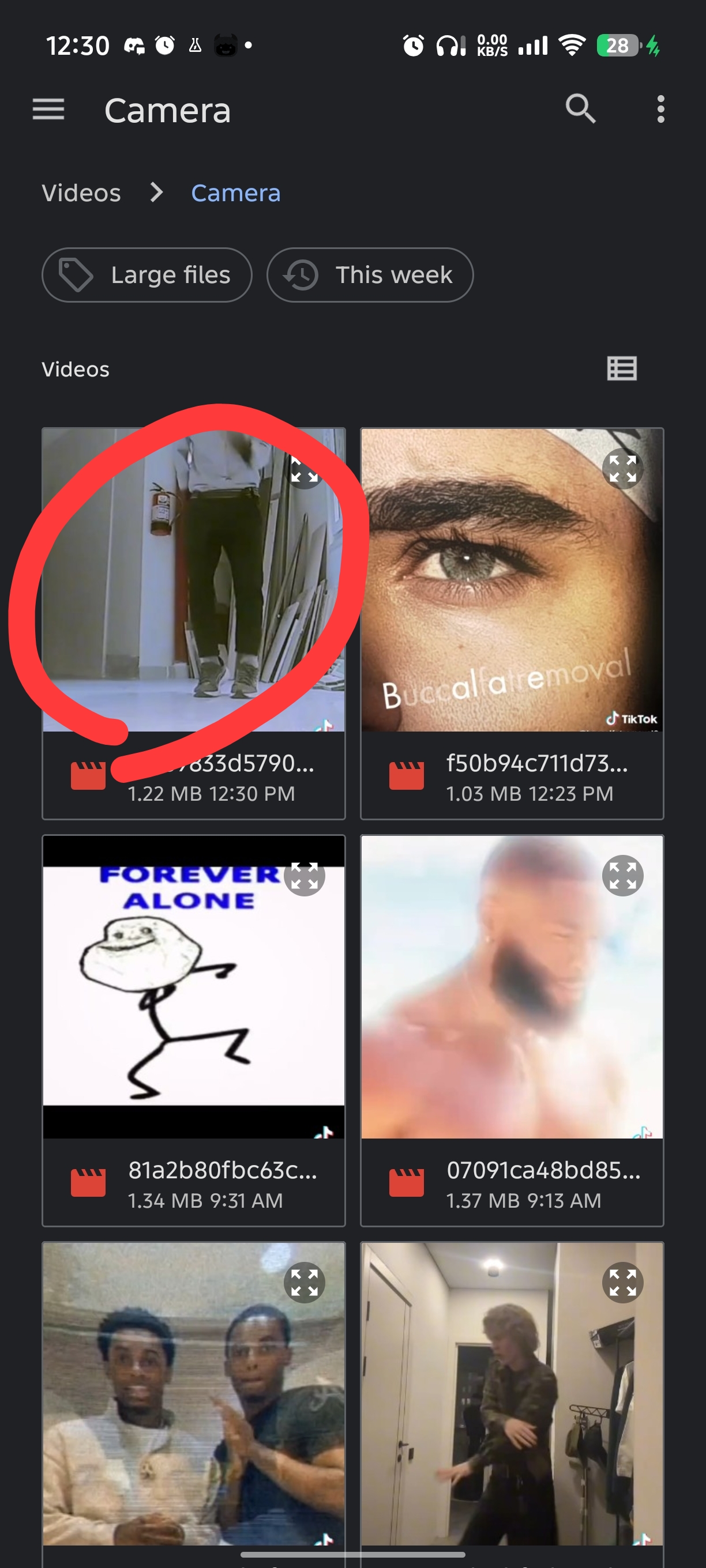
39597

In this case I pressed the top left one (ignore all the other corny videos I have)

Then here is the most important step you press the "insert" Button so the video gets disabled normally.
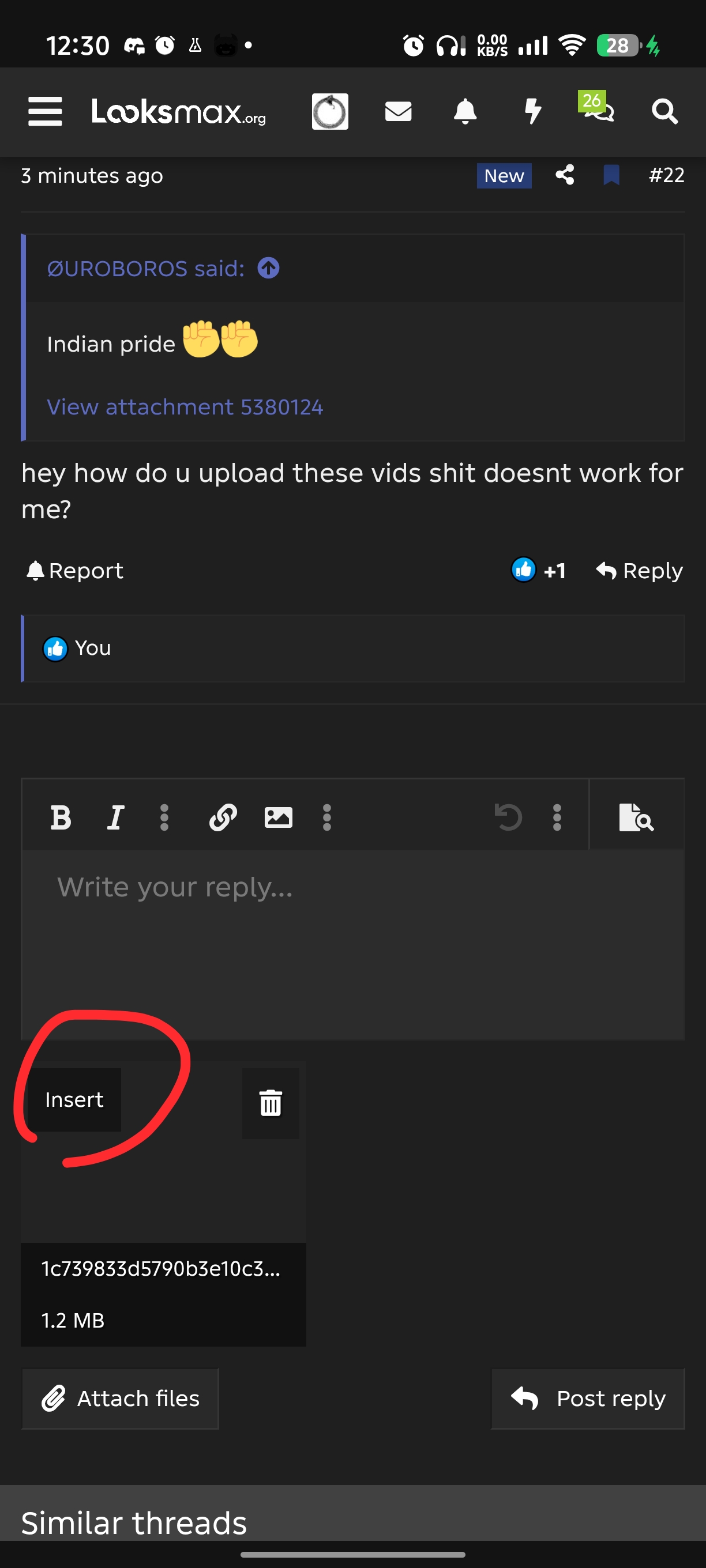
39599


And done you inserted the video that you want and it should look like this


@justinAnomaly @Stalker @RedDragonSlayer67 @Hurly saint
 
  • +1
  • Love it
  • JFL
Reactions: Nerogen, negative, Stalker and 17 others
mirin and repped
 
  • Love it
  • +1
Reactions: Nerogen and ØUROBOROS
thx lil bro
 
  • WTF
Reactions: ØUROBOROS
next thread how to fix images gettin squished
 
  • Love it
Reactions: ØUROBOROS
awesome shit BOTB deserving
 
  • Love it
Reactions: ØUROBOROS
Well I have seen a lot of users don't know how for some reason so I'm here to teach you how.


First you click on the Attach files button

View attachment 5380163

Then you click on your files app or whatever you have instead of it for videos (you can press the recorder for voice notes)

View attachment 5380170
Then you press the video that you want to insert
View attachment 5380172
In this case I pressed the top left one (ignore all the other corny videos I have)

Then here is the most important step you press the "insert" Button so the video gets disabled normally.
View attachment 5380178

And done you inserted the video that you want and it should look like this

View attachment 5380182

@justinAnomaly @Stalker @RedDragonSlayer67 @Hurly saint
Wow this grey is so smart
 
  • JFL
Reactions: ØUROBOROS
Well I have seen a lot of users don't know how for some reason so I'm here to teach you how.


First you click on the Attach files button

View attachment 5380163

Then you click on your files app or whatever you have instead of it for videos (you can press the recorder for voice notes)

View attachment 5380170
Then you press the video that you want to insert
View attachment 5380172
In this case I pressed the top left one (ignore all the other corny videos I have)

Then here is the most important step you press the "insert" Button so the video gets disabled normally.
View attachment 5380178

And done you inserted the video that you want and it should look like this

View attachment 5380182

@justinAnomaly @Stalker @RedDragonSlayer67 @Hurly saint
Been on this forum for a year and haven’t even know this :feelskek:
 
  • JFL
Reactions: ØUROBOROS and iwannasleeponurlap
  • +1
Reactions: iwannasleeponurlap
Bumb this thread deserves to be in BOTB

@negative @ICXCLuvr @Scarlet @Psl King @anondude
 
  • +1
Reactions: ANON
read every molecule
 
  • Love it
Reactions: ØUROBOROS
What abt puttin up images then clicking on it it becomes a different one
 
  • +1
Reactions: ltngreyy and ØUROBOROS
Well I have seen a lot of users don't know how for some reason so I'm here to teach you how.


First you click on the Attach files button

View attachment 5380163

Then you click on your files app or whatever you have instead of it for videos (you can press the recorder for voice notes)

View attachment 5380170
Then you press the video that you want to insert
View attachment 5380172
In this case I pressed the top left one (ignore all the other corny videos I have)

Then here is the most important step you press the "insert" Button so the video gets disabled normally.
View attachment 5380178

And done you inserted the video that you want and it should look like this

View attachment 5380182

@justinAnomaly @Stalker @RedDragonSlayer67 @Hurly saint
finally thank you chad:ogre:
 
  • Love it
Reactions: ØUROBOROS
I just copy/paste the instagram link and half the time it works, half the time it doesn't. Makes me rage.
 
  • +1
Reactions: ØUROBOROS
Well I have seen a lot of users don't know how for some reason so I'm here to teach you how.


First you click on the Attach files button

View attachment 5380163

Then you click on your files app or whatever you have instead of it for videos (you can press the recorder for voice notes)

View attachment 5380170
Then you press the video that you want to insert
View attachment 5380172
In this case I pressed the top left one (ignore all the other corny videos I have)

Then here is the most important step you press the "insert" Button so the video gets disabled normally.
View attachment 5380178

And done you inserted the video that you want and it should look like this

View attachment 5380182

@justinAnomaly @Stalker @RedDragonSlayer67 @Hurly saint
mirin camera roll
 
Well I have seen a lot of users don't know how for some reason so I'm here to teach you how.


First you click on the Attach files button

View attachment 5380163

Then you click on your files app or whatever you have instead of it for videos (you can press the recorder for voice notes)

View attachment 5380170
Then you press the video that you want to insert
View attachment 5380172
In this case I pressed the top left one (ignore all the other corny videos I have)

Then here is the most important step you press the "insert" Button so the video gets disabled normally.
View attachment 5380178

And done you inserted the video that you want and it should look like this

View attachment 5380182

@justinAnomaly @Stalker @RedDragonSlayer67 @Hurly saint
will this way still give me like a 2mb limit :feelskek:
 
Well I have seen a lot of users don't know how for some reason so I'm here to teach you how.


First you click on the Attach files button

View attachment 5380163

Then you click on your files app or whatever you have instead of it for videos (you can press the recorder for voice notes)

View attachment 5380170
Then you press the video that you want to insert
View attachment 5380172
In this case I pressed the top left one (ignore all the other corny videos I have)

Then here is the most important step you press the "insert" Button so the video gets disabled normally.
View attachment 5380178

And done you inserted the video that you want and it should look like this

View attachment 5380182

@justinAnomaly @Stalker @RedDragonSlayer67 @Hurly saint
Ty I actullt needed this like 2 days ago
 
  • Love it
Reactions: ØUROBOROS
will this way still give me like a 2mb limit :feelskek:
Go on imger upload the video there copy the link and paste it in the post or thread and then you won't have a limit.
 
  • +1
Reactions: jf8
  • Love it
Reactions: ØUROBOROS
This is genius
 
  • Love it
Reactions: ØUROBOROS
Well I have seen a lot of users don't know how for some reason so I'm here to teach you how.


First you click on the Attach files button

View attachment 5380163

Then you click on your files app or whatever you have instead of it for videos (you can press the recorder for voice notes)

View attachment 5380170
Then you press the video that you want to insert
View attachment 5380172
In this case I pressed the top left one (ignore all the other corny videos I have)

Then here is the most important step you press the "insert" Button so the video gets disabled normally.
View attachment 5380178

And done you inserted the video that you want and it should look like this

View attachment 5380182

@justinAnomaly @Stalker @RedDragonSlayer67 @Hurly saint

bump
 
  • Love it
Reactions: ØUROBOROS

Similar threads

RedDragonSlayer67
Replies
3
Views
29
RedDragonSlayer67
RedDragonSlayer67
foiddestroyerkenny9
Replies
5
Views
45
ilikefish
ilikefish
ugly piece of shit
Replies
11
Views
99
ugly piece of shit
ugly piece of shit
iregreteverything33
Replies
20
Views
103
mycokismyglock
mycokismyglock
H
Replies
0
Views
7
highefforthreads
H

Users who are viewing this thread

Back
Top